TikTok Parental Controls: Are They Enough to Keep Kids Safe?

TikTok is a social media app that has exploded in popularity in recent years, especially among younger users. In the U.S., 63% of teens ages 13–17 say they use TikTok, and about 1 in 5 say they use the platform almost constantly. With so many young people spending time on the platform, it is no surprise that parents are asking an important question: how safe is TikTok for kids?
While TikTok can be a source of creativity, entertainment, and connection, parents also want to understand the potential risks children may face and what tools are available to help them use the platform safely.
To provide the best guidance for kids, parents must understand TikTok’s parental controls and the additional tools available to them.
Key Takeaways
- TikTok is among the most popular social media platforms for teens. However, it can pose safety risks for younger users.
- For teen accounts, TikTok automatically enforces some limits and restrictions, such as prohibiting direct messages for users under 16. Parents can also use the Family Pairing feature, which provides a variety of parental control options.
- Though TikTok offers many tools to enhance the safety of teens’ experiences on the platform, these features have limitations and are not a substitute for active parental involvement.
- Additional parental control options, such as Kids360, can provide an extra layer of protection on TikTok and in the wider digital world.
Table of Contents
Is TikTok Safe for Kids?
TikTok is known for its engaging short-form videos, chosen for each user’s interests and compiled into its video feed called the For You Page (FYP). The For You feed is tailored to drive engagement and keep users continuously scrolling to the next attention-grabbing video.
This format can make TikTok highly engaging for young users, which has raised concerns about excessive screen time, potential overuse, and the platform’s impact on youth wellbeing. According to a Pew Research study, most teens who use TikTok say they spend more time on the app than they would like.
Beyond screen time, parents also worry about the type of content children may encounter, interactions with other users, and whether built-in safety features provide enough protection. A report from the Center for Countering Digital Hate has raised concerns that TikTok’s recommendation system may expose young users to harmful content, even when they are not actively searching for it.
Considering these factors, TikTok safety depends not only on the platform itself but also on how it is used and supported by parents. Built-in safety features can help reduce potential risks, but they work best when combined with family rules, open conversations, and active guidance. Let’s explore what TikTok’s parental controls offer and where additional tools may help.
TikTok Family Pairing
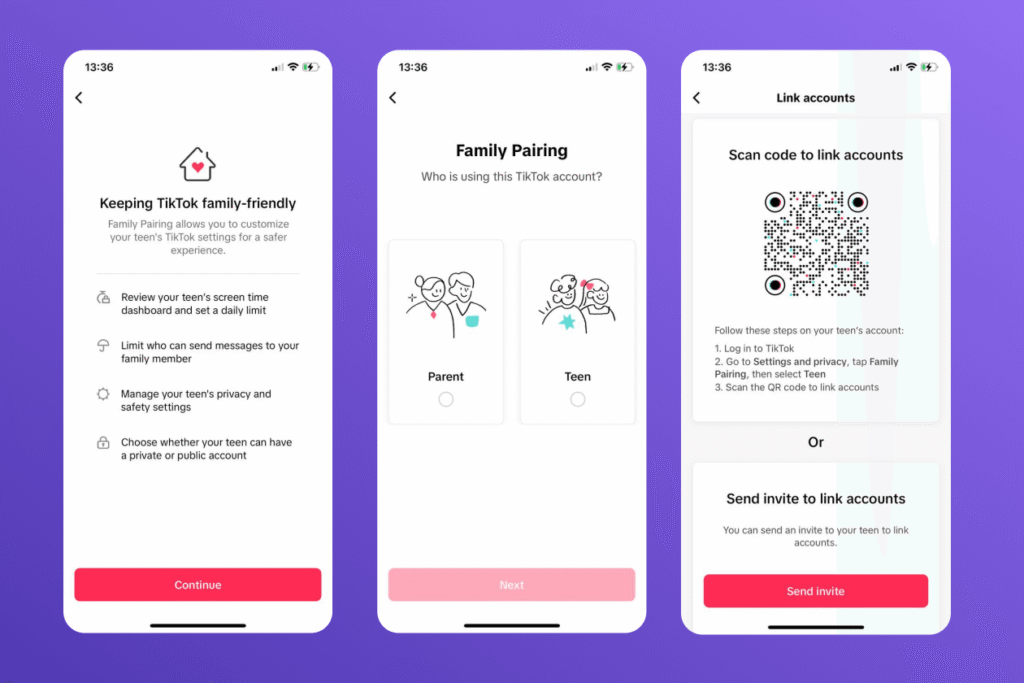
To help families manage a teen’s TikTok experience, the platform offers Family Pairing, which links a parent’s account with their child’s. Once connected, parents can see who their teen follows, which accounts they have blocked, who follows them, and review their privacy settings.
Family Pairing also allows parents to manage several aspects of how their teen uses TikTok. They can limit or disable direct messages, choose who can comment on videos or turn comments off completely, enable Restricted Mode to reduce exposure to mature content, set daily screen time limits, schedule TikTok-free hours, and receive notifications when privacy settings are changed.
To access these features, parents first need their own TikTok account. Once both accounts are set up, linking a parent’s and teen’s profiles through Family Pairing only takes a few minutes:
- In the TikTok app, tap Profile at the bottom.
- Tap the Menu ☰ button at the top, then select Settings and privacy.
- Tap Family Pairing.
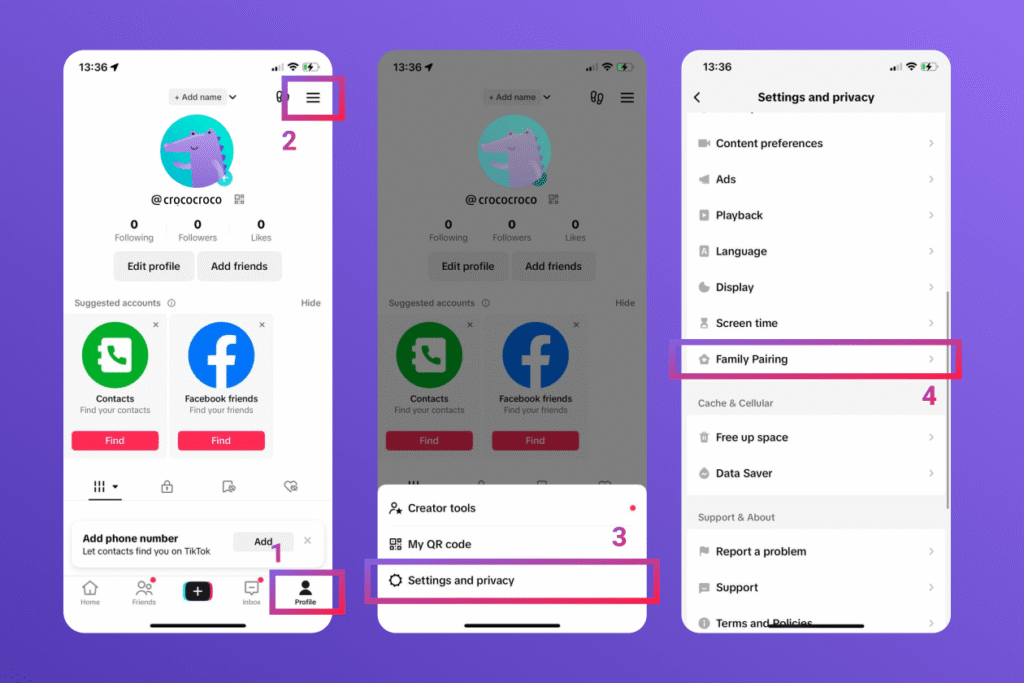
- Tap Continue.
- Tap Parent or Teen, then tap Next.
- Follow the steps to link the accounts.
TikTok Screen Time Limits
When a teen creates their TikTok account, the platform automatically puts some restrictions into place, including a 60-minute daily time limit. Therefore, it is important that an accurate age is recorded when creating the child’s account.
Time limits can be set in Family Pairing, as well as directly in the platform’s settings. To set a daily screen time limit through Family Pairing:
- Open the TikTok app, tap Profile at the bottom.
- Tap the Menu ☰ button at the top, then select Settings and privacy.
- Tap Family Pairing.
- Select your teen’s account.
- Tap Screen time.
- Tap Daily screen time and choose the amount of time your teen can spend on TikTok each day.
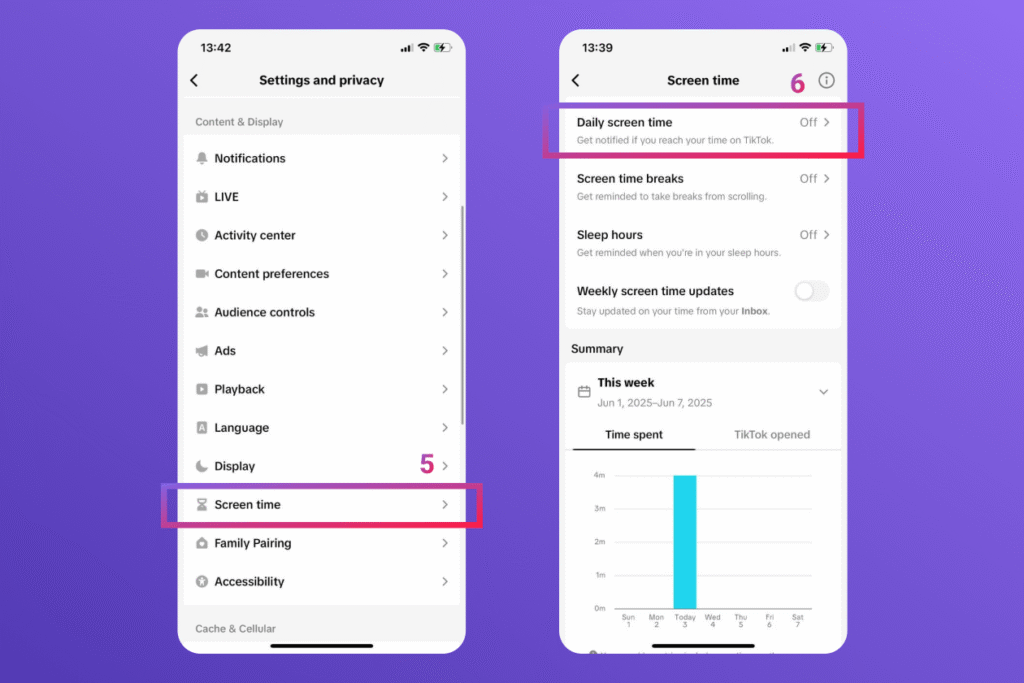
- Tap Save to apply the limit.
To add or change a daily time limit from a web browser:
- Click your profile picture at the top.
- Click Settings.
- Tap Family Pairing.
- Select your teen’s account.
- Click Screen time, then click Daily screen time.
- Turn the daily screen time setting on and choose a time limit or schedule a time limit for each day.
Parents can also schedule Time Away periods, which make TikTok unavailable during specific hours, such as school time, homework, or bedtime. During these scheduled periods, the app remains locked unless additional screen time is approved by a parent.
Through Family Pairing, parents can also monitor their teen’s TikTok usage with the Screen Time Dashboard. It provides an overview of how much time their child spends on the platform each day, how often the app is opened, and how usage is divided between daytime and nighttime activity.
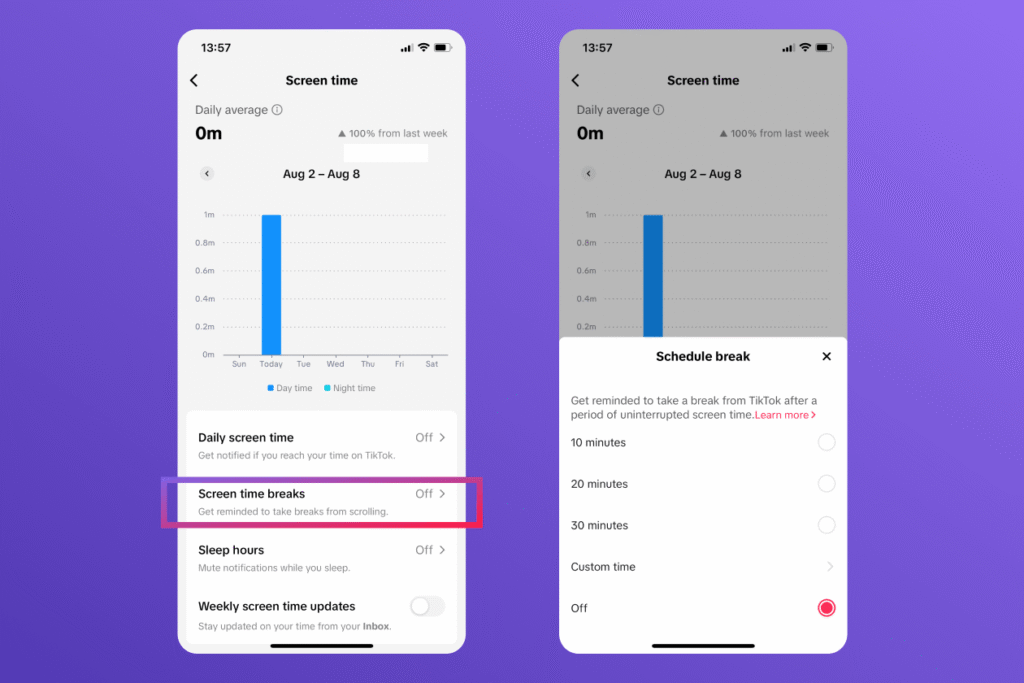
Another useful feature is the ability to schedule Screen Break reminders. When enabled, the app will send break reminders after the user has been continuously active for a certain period.
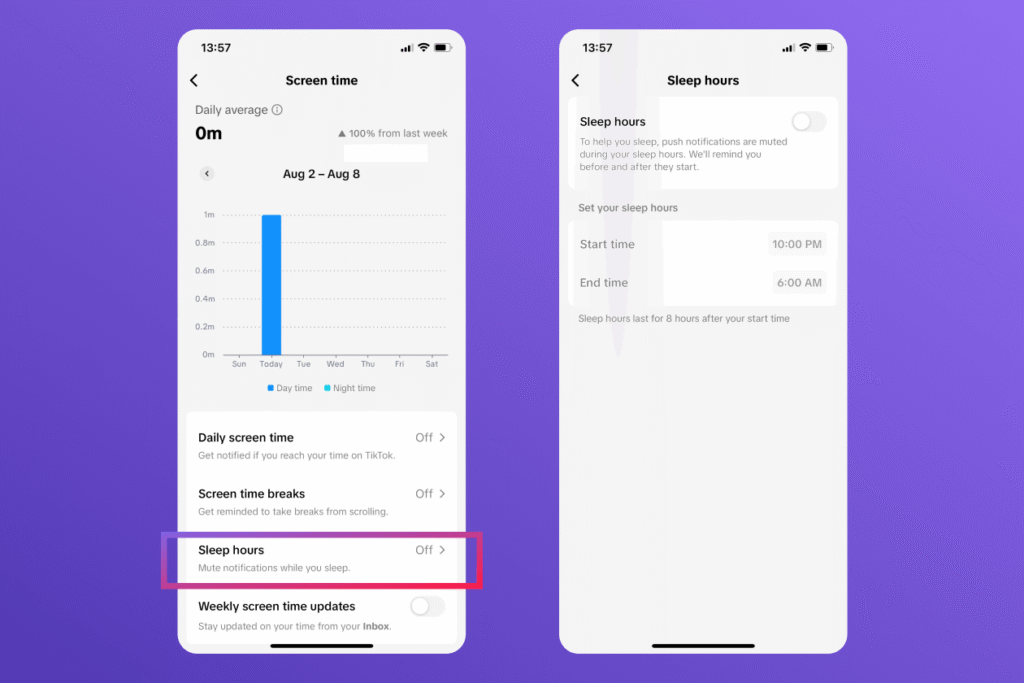
Finally, TikTok offers Sleep Hours, which automatically mute push notifications overnight and help reduce distractions before bedtime. For any teen’s account, push notifications are automatically muted during sleep windows.
Restricted Mode and Content Preferences
An important tool that parents can access in Family Pairing is TikTok’s Restricted Mode. When enabled, this mode limits content that may not be appropriate for kids, such as mature, complex, or uncomfortable topics.
To turn Restricted Mode on or off:
- In the TikTok app, tap Profile at the bottom.
- Tap the Menu ☰ button at the top, then tap Settings and privacy.
- Tap Family Pairing.
- Select your teen’s account.
- Tap Content preferences.
- Tap Restricted Mode.
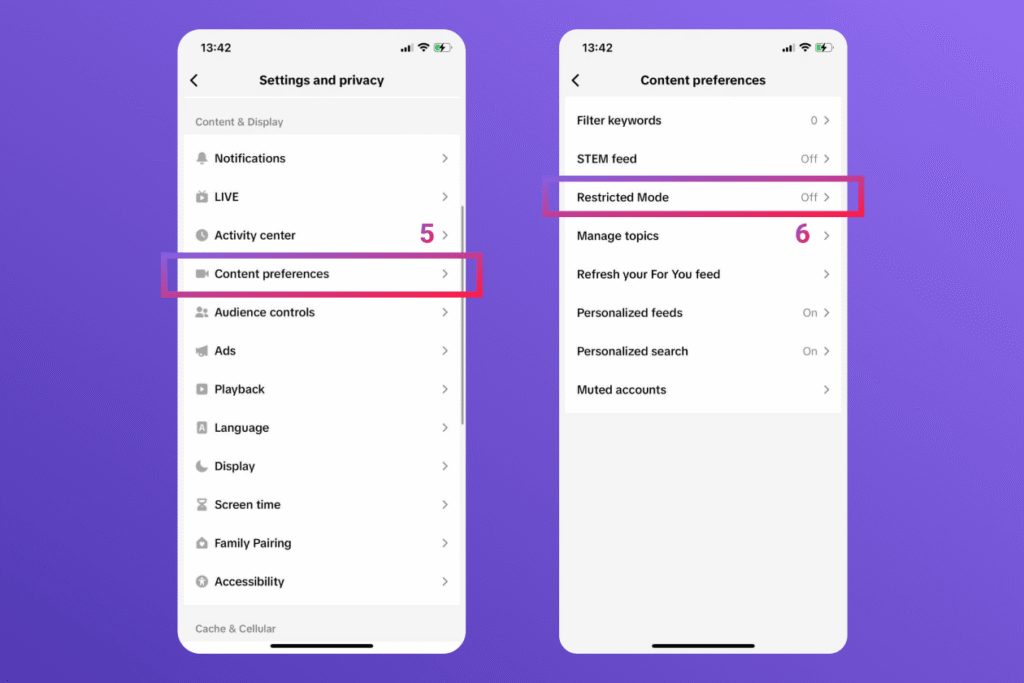
- Follow the steps in the app to set or enter a passcode, then turn Restricted Mode on or off. If this is your first time turning on Restricted Mode, you’ll need to tap Turn on before you can set a passcode.
Parents can also use Family Pairing to filter content their teen sees by adding specific keywords or hashtags. TikTok will then filter posts containing these keywords from the teen’s For You and Following feeds, helping reduce exposure to topics that parents consider inappropriate or unsuitable.
To add keyword filters:
- In the TikTok app, tap Profile at the bottom.
- Tap the Menu ☰ button at the top, then select Settings and privacy.
- Tap Family Pairing and select your teen’s account.
- Tap Content preferences, then Filter keywords.
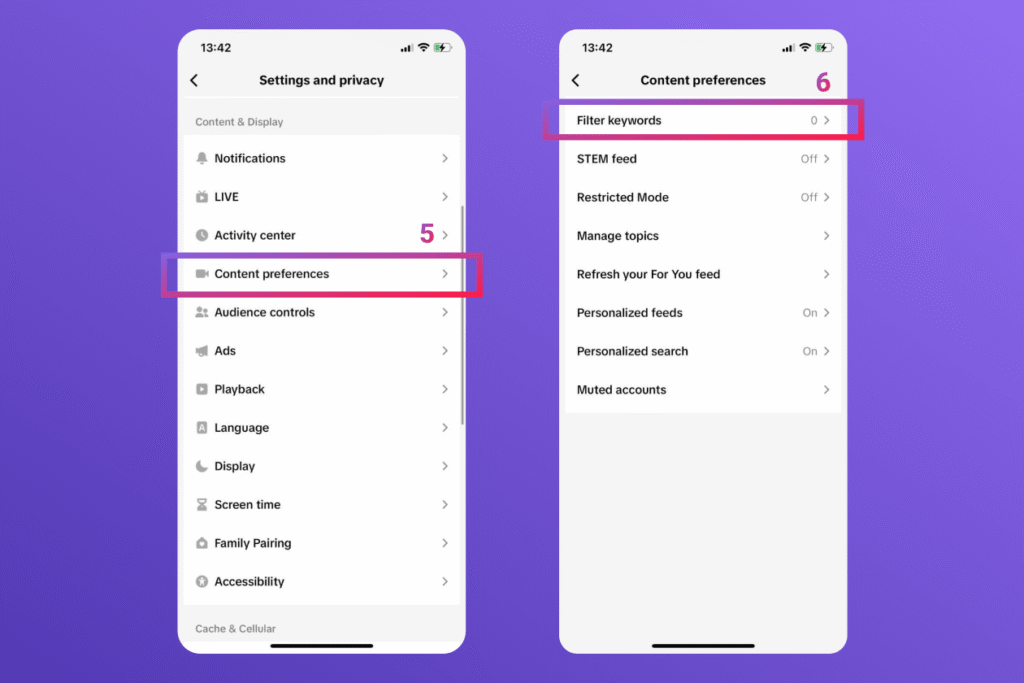
- Tap Add keyword, then enter a word or hashtag that you’d like to filter and select the feed(s) that you’d like to filter keywords from.
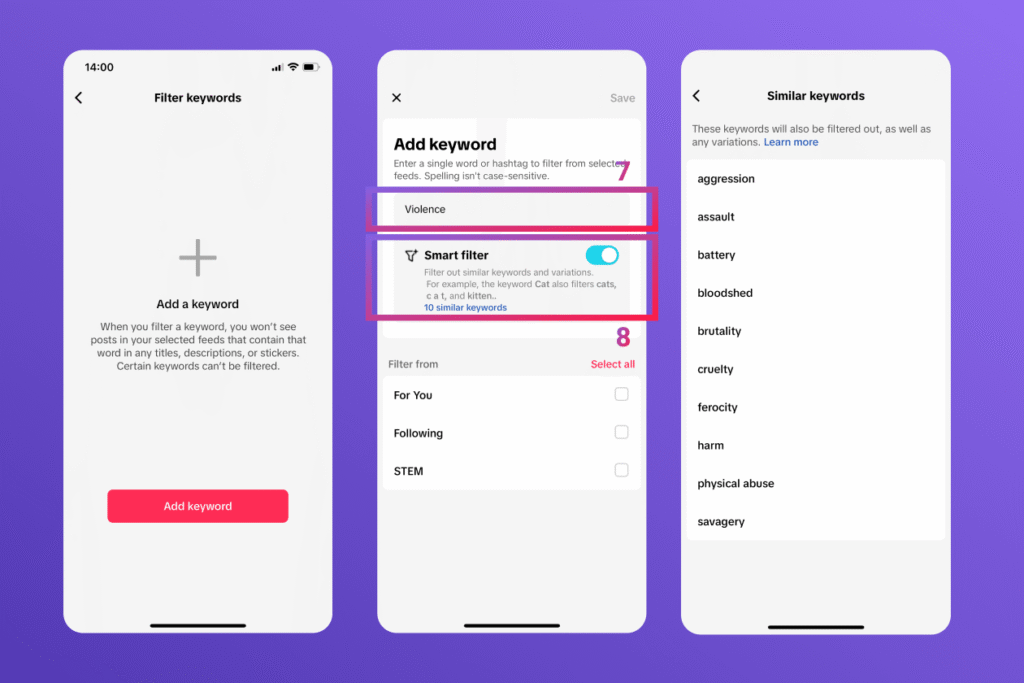
- Tap Save.
Parents can add up to 100 keywords. They can also enable Smart filter, which helps detect related keywords and variations. However, TikTok does not display every filtered variation, and some keywords may not be available for filtering.
Another TikTok feature parents can control is their child’s STEM feed. This is an optional feed that focuses on content related to science, technology, engineering, and math (STEM). If the STEM setting is turned on, a dedicated tab will be added to the top of the app screen. This feed shows education-focused videos that have passed quality checks from independent fact-checkers and safety assessors.
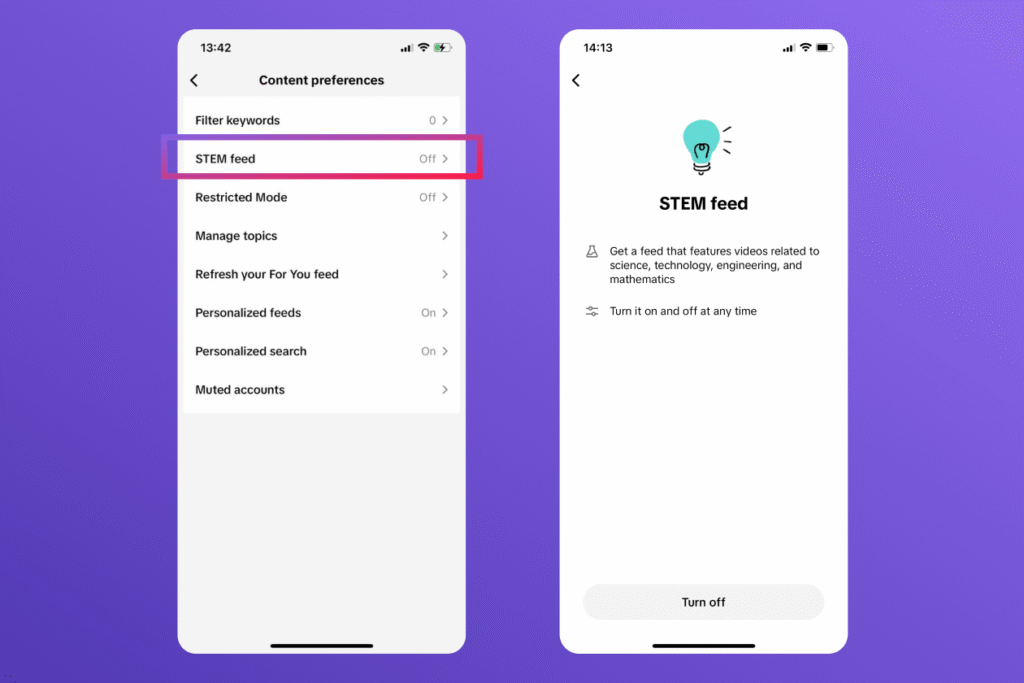
Parents can also manage other content preferences through Family Pairing, including:
- Search settings — limit your teen’s ability to search for hashtags, videos, and LIVE content.
- Blocked accounts — prevent specific accounts from appearing in your teen’s feed.
- Customized updates and notifications — stay informed about changes to your teen’s TikTok activity and settings.
Privacy Settings Parents Should Review
Family Pairing gives parents more visibility into their teen’s privacy choices and allows them to adjust important account settings. One of the first things to check is whether the account is public or private. Public accounts can be viewed by anyone on TikTok, while private accounts only allow approved followers to see the teen’s content.
Parents can also manage who can comment on videos, view liked posts, and interact with their teen’s content. They can turn off account recommendations if they do not want the profile to be suggested to other users, and control whether others can use the teen’s videos through features like Duet and Stitch.
Direct messages are another important setting to review. TikTok only allows direct messaging for users aged 16 and older. However, through Family Pairing, parents can disable direct messages for teens aged 16–18 if they prefer to add an extra layer of privacy.
Through Family Pairing, parents can also check their teen’s followers, following list, and blocked accounts. If a user is blocked, they can no longer interact with the teen’s account or find it through search.
Additionally, TikTok has Community Guidelines that all accounts must follow. If a teen decides that other users have violated these rules, they can report the violation and then choose to notify their parent. This gives the parent the opportunity to talk to their child about what they saw and why it was concerning.
TikTok Parental Controls Limitations
Though TikTok’s parental control tools have many benefits, they still have limits. Family Pairing offers a variety of safety resources, but it is only available when the parent and child link accounts. If the teen creates a second account with a different email address, none of the Family Pairing safety settings work on that account. Similarly, if a child accesses TikTok through a web browser rather than through the app, none of the in-app controls apply.
Other features can also have pitfalls. Restricted Mode can filter out most videos with mature content, but inappropriate videos could still slip past its sensors. And screen time limits can be bypassed using a parent’s passcode, which kids might be able to guess.
An even larger issue concerns underage users having access to the platform in the first place. Given its extreme popularity, kids can feel a lot of peer pressure to join TikTok. Since age verification simply relies on the birth date entered when creating the account, kids can enter false information to bypass all safety features.
Unfortunately, unmonitored kids can easily open accounts and hide them from parents. In fact, research shows that 6.3% of children aged 11–12 have a hidden social media account their parents don’t know about.
Kids360: A Complete Solution for Managing TikTok and Smartphone Habits
For some families, TikTok’s built-in safety tools may not be enough. Dedicated parental control solutions like the Kids360 app can provide additional supervision options, helping parents manage not only TikTok activity but their child’s overall digital experience.
When excessive screen time is an issue, Kids360 lets parents set daily screen time limits. This can be for overall device use or on TikTok specifically. Parents can also schedule time windows when kids should not use their devices or have limited access. These might include sleep hours, family time, or the school day. Rather than constantly nagging kids to stop scrolling, parents can simply set balanced limits in advance.

Kids360 can notify parents when their child has hit or exceeded their time limit and warn the child before their time runs out. It can even be set for kids to earn extra screen time by completing learning tasks, physical exercise, or chores. These habits can help teach kids to manage screen time and practice self-regulation. This makes Kids360 a parental control tool that kids actually enjoy.
Moreover, Kids360 shows parents how much time their kids spend on TikTok and other apps. Parents can also monitor their kids’ browser history to see which sites they visit most. This knowledge keeps parents in the loop regarding their teen’s online experiences. And for kids who are not ready for TikTok, parents can use Kids360 to block access to the platform entirely, along with any other inappropriate platforms.
To explore all of the digital well-being tools in the Kids360 app, you can try it for free. It is available for Apple devices, Android devices, and others.
TikTok Parental Controls vs Dedicated Parental Control with Kids360
Both TikTok’s built-in tools and dedicated parental control apps can support safer digital habits. However, they serve different purposes. Here is a quick comparison of TikTok’s built-in tools and Kids360:
| Feature | TikTok Controls | Kids360 |
|---|---|---|
| Limit TikTok usage | ✓ | ✓ |
| Manage other apps | ✗ | ✓ |
| Screen time overview | ✓ (TikTok only) | ✓ |
| Device schedules | ✓ (TikTok only) | ✓ |
| App restrictions | Limited | ✓ |
| Phone usage insights | ✗ | ✓ |
| Family management | ✓ TikTok accounts only | ✓ Multiple devices and family members |
TikTok’s Family Pairing is a useful starting point for parents who only want to manage their teen’s activity on the platform. However, families looking for a more complete approach to digital wellbeing may need tools that cover the entire device, not just one app. Kids360 combines screen time management, app restrictions, schedules, usage insights, and family safety features in one place, helping parents support healthier technology habits as children grow.
In the end, it is up to parents to decide if their child is ready for TikTok. Like any social media platform, it can pose safety risks that are best managed with an adult’s supervision. Both kids and parents can have a better TikTok experience when they have ongoing conversations about setting and following safe limits.
Sources & References
- 8 facts about Americans and TikTok, Pew Research Center, 2026
- Teens’ Experiences on TikTok, Instagram, and Snapchat, Pew Research Center, 2026
- Deadly by Design. TikTok pushes harmful content promoting eating disorders and self-harm into young users’ feeds, Center for Countering Digital Hate, 2022
- TikTok Support, 2026
- Is TikTok Safe For Kids?, Motley Rice, 2025
- How Many Children Use TikTok Against the Rules? Most, Study Finds, University of California San Francisco, 2025