Instagram Teen Accounts: Real Protection or Just a First Step?

Did you know that according to research published by the American Psychological Association, U.S. teens now spend an average of nearly 5 hours a day on social media, with Instagram being one of the top three apps consuming their attention? Among high-frequency users, 17% report poor body image and 41% rate their overall mental health as poor.
To help parents protect young users from excessive screen time and unrealistic standards, Meta launched Instagram Teen Accounts, which automatically turn on strict safety rules. This guide breaks down exactly what these changes mean for your family, how they work day-to-day, and how to use extra tools to keep things balanced at home
Key Takeaways
- Instagram introduced Teen Accounts to address major online safety risks, including uninvited contact from strangers, exposure to inappropriate content, and excessive late-night scrolling that impacts teen mental health.
- New Instagram profiles created by minors default to private settings, restrict direct messages to followed contacts, filter sensitive content, and enforce a 60-minute daily limit alongside an overnight sleep mode.
- Built-in Instagram settings are not a complete solution because tech-savvy teens can bypass them using fake birth dates or secondary unlinked accounts, and the built-in controls only restrict activity inside Instagram itself.
- The Kids360 app delivers comprehensive, device-wide digital wellbeing by managing overall phone screen time, blocking dangerous 18+ web content across all apps, and giving parents complete peace of mind.
Table of Contents
What Are Instagram Teen Accounts?
Simply put, Instagram Teen Accounts are a built-in safety setup designed just for young users. Instead of leaving it up to your teenager to configure their privacy options, the platform applies protective settings automatically to every Instagram account within this minor age bracket. This takes the heavy pressure off your child and puts safety guardrails in place from day one.
The main goal is to tackle the exact things parents worry about most: random strangers sending messages, inappropriate content popping up on their feeds, and endless scrolling late at night. By altering how minors use the platform, these updated Meta products aim to provide features that make digital life a bit safer and easier to manage. Meta is intentionally building technology to give families better control over their daily interactions.
Who Gets an Instagram Teen Account?
This setup rolls out automatically for every user under 18, but the rules are split into two groups based on age. For new users, the security features apply the moment they sign up for the service:
- Teens Under 16: This group gets the tightest restrictions. The safety settings are locked by default. If teens under 16 want to change their profile to make it more public, the app will block it until a parent logs in and gives the okay.
- Teens Aged 16 and 17: Older teens get the same safe setup automatically when they sign up. However, they can change their settings back on their own unless a parent actively turns on the parental supervision tools to lock them in.
This applies to both new accounts and profiles that teens already have. The moment the app verifies a user’s age as a minor, it moves their teen accounts into this secure setup.
What Changes Automatically?
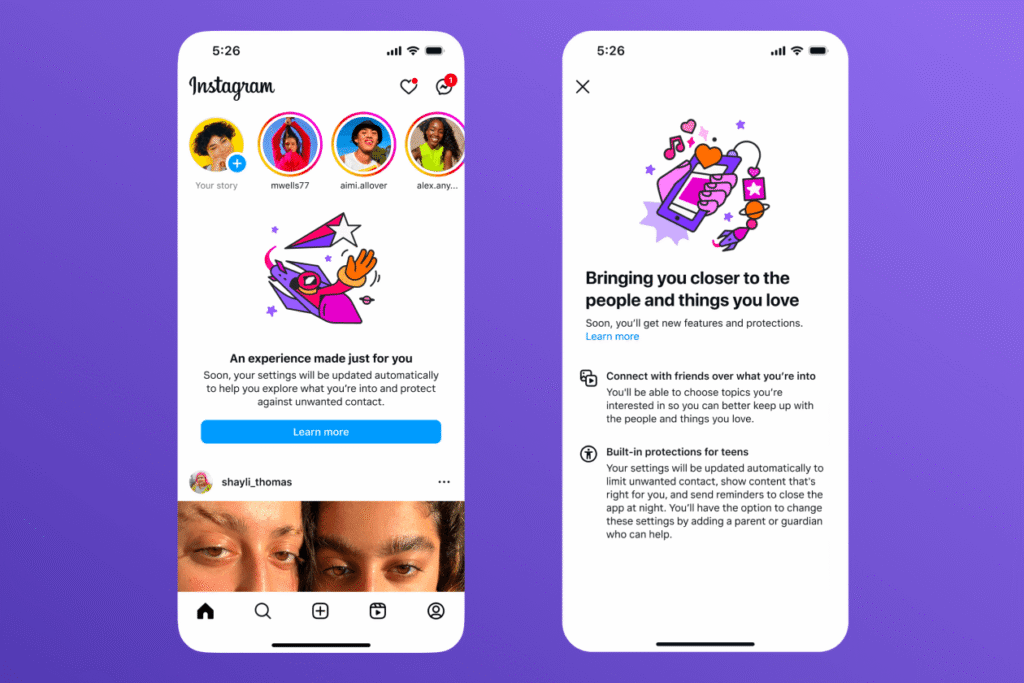
The moment a teen logs in under this new system, the app changes several basic account settings without you or your child lifting a finger.
First, minors are placed into private accounts by default, hiding their photos, stories, and videos from the public web and blocking strangers from finding their profile in search. Second, the app automatically restricts messaging rules so only followed contacts can reach them. Finally, strict content settings and overnight sleep mode turn on automatically to limit mature feeds and late-night scrolling.
Essentially, these combined defaults shrink their digital world to allow only limited interactions with verified friends.
Instagram Teen Accounts vs Regular Instagram Accounts
To see how much actually changes, it helps to compare a standard adult Instagram account with the minor setup side-by-side:
| Feature | Regular Instagram | Teen Account |
|---|---|---|
| Account privacy | Public by default for adults; depends on choice | Private accounts by default; locked under age 16 |
| Messaging | Open access; anyone can send a request | Stricter defaults; only people they follow can message them |
| Sensitive content | Standard settings based on what you view | Heavily limited; strict filters block mature topics |
| Parental supervision | Optional opt-in required by both users | Pre-configured tools designed with teens in mind |
| Time reminders | Optional reminders you have to turn on | Automatic 60-minute time limits and overnight sleep mode |
Why Did Instagram Introduce Teen Accounts?
Meta didn’t just make these changes out of the blue. The decision stems from years of intense public scrutiny, legislative pressure, and alarming reports regarding social media’s impact on youth mental health:
- Internal documents leaked to The Wall Street Journal revealed that Meta’s own researchers knew Instagram was “toxic for teen girls,” finding that the app worsened body image issues, anxiety, and eating disorders for a significant portion of young users.
- Investigative reports by The Guardian demonstrated that Instagram’s recommendation algorithms actively promoted dangerous dieting, extreme weight loss, and self-harm content to teenagers after they interacted with just a few related posts.
- Dozens of U.S. states filed landmark lawsuits accusing Meta of intentionally engineering addictive platform features that exploit young minds while ignoring known safety risks.
- Formal advisories from the American Psychological Association (APA) pushed regulators worldwide to mandate stricter privacy defaults, stranger interaction blocks, and age-appropriate content boundaries.
By updating how they approach building technology for youth to improve products, Meta launched Teen Accounts to address these specific safety risks directly and demonstrate corporate responsibility.
How Instagram Teen Accounts Work
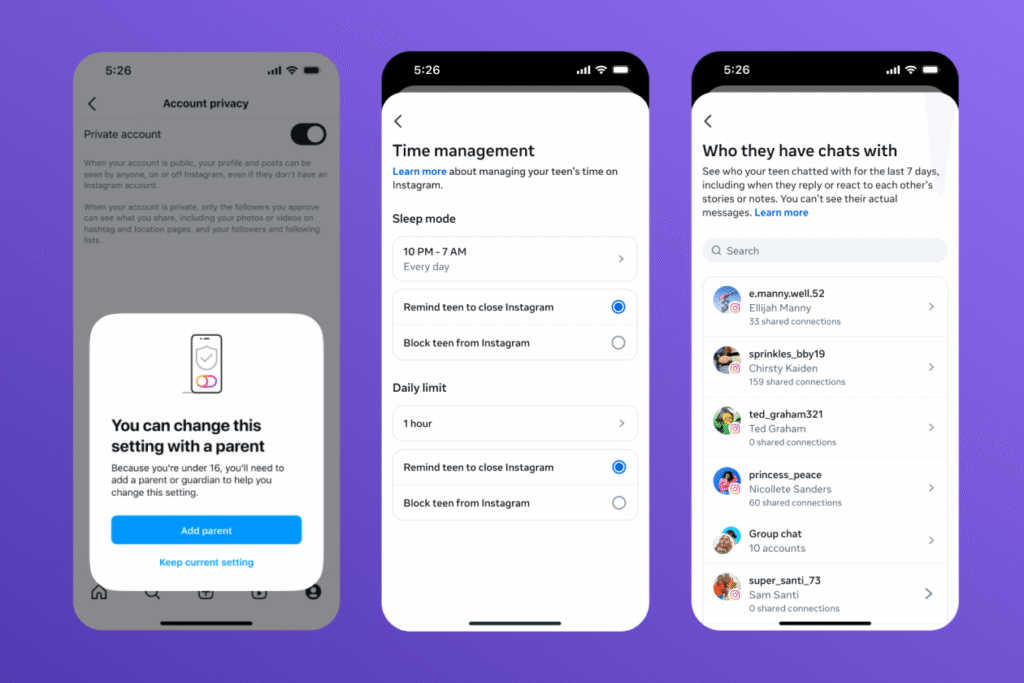
The system relies on core pillars to keep the digital environment safe, focusing on who can talk to your teen, what they can see, and how long they can look at it.
Privacy Settings
With private accounts as the absolute standard, random people cannot view your child’s videos or posts. Even better, your teen has to manually approve any new followers before those users can see anything. This stops strangers from keeping tabs on your child’s daily life or saving their photos.
Messaging Restrictions
Unwanted DMs are one of the biggest digital risks for youth. The app fixes this by blocking message requests from accounts your teen doesn’t know. Minors can only receive messages from profiles they already follow. This simple barrier keeps strangers out of their inbox. Your teen can only send direct messages to people they already connect with.
Sensitive Content Restrictions
The app’s algorithm changes drastically to filter out inappropriate content. The absolute strictest content settings are applied automatically to ensure mature themes don’t show up on their home or explore pages. The system actively works to remove content or hide material related to:
- Self-harm and self-injury
- Explicit or graphic violence
- Content promoting eating disorders
- Posts about cosmetic procedures or unrealistic body standards
The app also turns on the hidden words feature by default. This tool automatically scans comments, filtering out any offensive words or bullying phrases before your teen ever reads them.
Time Management Features
To help prevent screen addiction, the app builds in time limits. After your teen spends 60 minutes on the app in a single day, a notification pops up telling them it’s time to close it. This gives parents a way to set limits effortlessly.
Additionally, an automatic sleep mode turns on every night between 10:00 PM and 7:00 AM. During these hours, the app silences all incoming messages and notifications, helping your child actually disconnect and get some sleep. These built-in limits keep their habits healthy.
Parental Supervision: What Parents Can Manage
You can access all of these tools through Instagram’s Family Center. To set up parental supervision:
- Open the Instagram app and go to your profile.
- Tap the ☰ menu in the top-right corner.
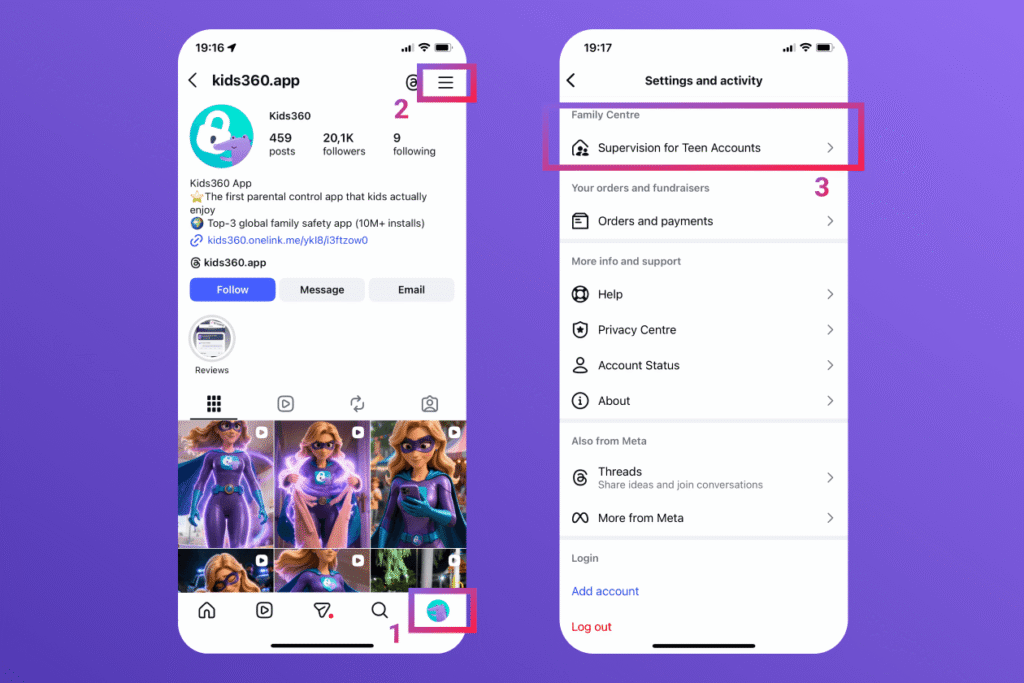
- Select Family Center.
- Follow the prompts to link your account with your teen’s profile.
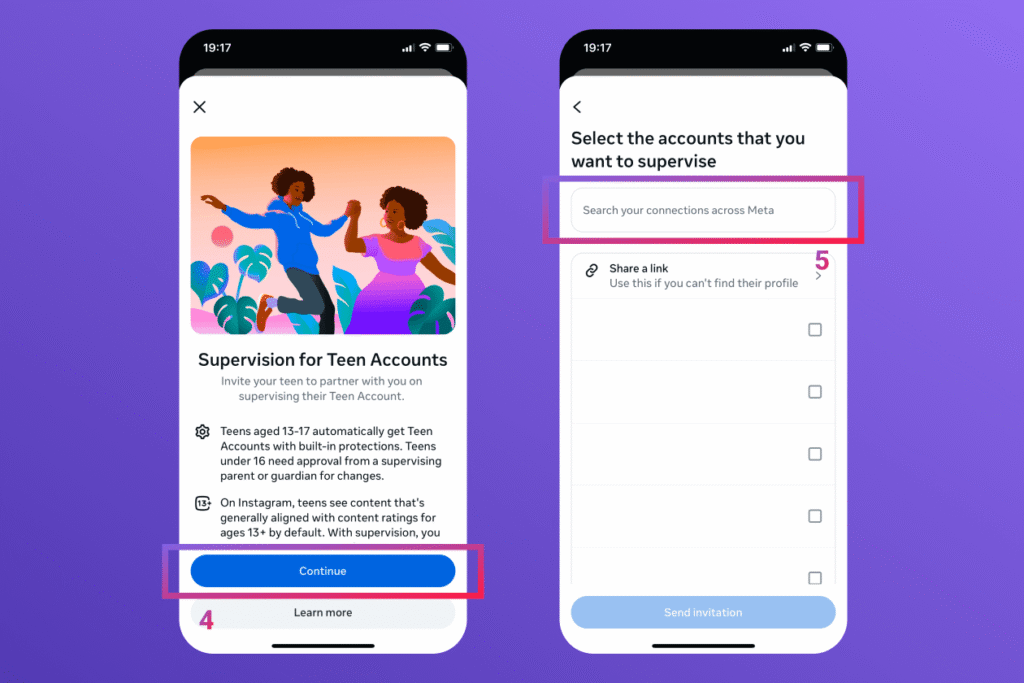
Once you link your profile to your teen’s, you get an easy dashboard to check in on their habits and information management options securely.
From this portal, you can see exactly how much time they spend on the app daily. You won’t be able to read the actual text of their chats, but you can see a list of who they’ve been talking to over the past week.
If your child is under 16 and wants to lower their protections, like making their account public, the app won’t let them. They have to send a digital request to you, and nothing changes until you grant explicit permission to change those account settings. Your teen does not have the permission to change these structural rules without a parent’s permission.
Are Instagram Teen Accounts Really Safe?
While these new Instagram features are a massive help, they aren’t perfect. Tech-savvy teens are great at finding workarounds, like typing in a fake birth year when they create a profile, or making secret new accounts using a different email address.
In addition, many parents say the new safeguards aren’t always foolproof in practice. Some report technical glitches or loopholes that allow restrictions to be bypassed, while others feel the features don’t go far enough to address broader online safety concerns.
It’s also important to remember that these built-in limits only work inside one app. If your child hits their daily time limits there, they can easily jump over to another unregulated social media app to keep scrolling.
Instagram’s tools can’t track general internet safety, nor can they stop your teen from stumbling onto inappropriate content on a regular web browser. True digital safety takes a broader approach that looks at the whole device.
How to Make Instagram Safer for Your Teen
Keeping your kids safe online works best when you combine app settings with smart tracking software and open communication.
1. Use the Kids360 App for Full Digital Wellbeing
Instagram’s built-in rules only cover one app, but the Kids360 mobile app helps you manage your child’s entire phone. It gives parents a gentle, balanced way to monitor screen time while supporting a child’s learning and growth, offering true peace of mind. Because it works across the whole smartphone environment, you aren’t stuck relying on individual social media settings.
| Kids360 Core Feature | Functionality & Purpose | Key Benefit for Families |
|---|---|---|
| Screen Time Management | Hard daily limits and customizable schedules | Prevents endless scrolling; balances online and offline life |
| App Usage Statistics | Detailed analytical logs of app uptime | Identifies exact attention drains and tracks screen trends |
| App Blocker & Safe Web | Restricts specific apps and blocks 18+ websites | Protects the child sitewide beyond separate social apps |
Screen Time Management
The core feature lets you set limits for overall phone and social media use. By setting daily limits, you can step in before scrolling becomes an endless loop, helping your child find a healthy balance between phone time and real life.
You can use the Kids360 Screen Time Limits tool to automatically lock distracting games or apps during school hours or family dinners. This lets you control how much time they spend online.
App Usage Statistics
The app gives you clear, easy-to-read reports on how your child spends their day online. You can see if their social media time is creeping up and track which accounts are stealing most of their attention. This transparency helps you catch bad screen habits early.
App Blocking and Internet Safety
Kids360 also includes powerful blocking features that go way beyond social media. You can block sketchy apps entirely and filter out dangerous 18+ content across the web. This keeps them safe even when they leave Instagram to explore the internet.
If you want an all-in-one safeguard for your family, you can download the latest version of the Kids360 app and try it for free on the App Store or Google Play right now!
2. Review Privacy Settings Together
Sit down with your teen now and then to look over their account settings and content settings together. Check the accounts center to make sure your parental link is still connected. Use this as a chance to show them how to use tools like the hidden words filter or explain how to submit teen reports if they ever run into a bully or a creepy account.
3. Establish Proactive Family Rules
Technology works best when you back it up with real-world family agreements. When setting up new devices, sit down together to review privacy preferences, teaching your child how to choose cookies or decline optional cookies so they understand how tracking networks use similar technologies to follow their web activity.
- Discuss online privacy: Talk openly about how the internet is permanent. Remind them to think twice before oversharing personal details, their current location, or school schedules with new followers.
- Explain the risks of strangers: Remind them that people online aren’t always who they say they are. Help them understand that having limited interactions with unverified accounts is about protection, not control.
- Agree on screen time rules: Work on boundaries together instead of just handing down rules. Agree on phone-free zones, such as keeping chargers out of bedrooms at night, and encourage plenty of daily offline activities like sports, reading, or hanging out as a family.
Determining the Right Age for Instagram
Legally, kids must be at least 13 to sign up for an Instagram account. However, age on a birth certificate doesn’t automatically mean a child is emotionally ready for the digital world. Every kid matures differently, and some need a little extra time to build the confidence and critical thinking skills required to navigate peer pressure online.
Look for age-appropriate maturity cues before letting them jump into social media. Parents should ensure their kids are exposed to age-appropriate content, age-appropriate topics, and age-appropriate experiences that match their developmental growth. If they struggle to log off or tend to hide what they are doing online, it might be best to wait, enforce tight parental controls, or block teens from installing social media until they are a bit older.
Sources & References
- Instagram Teen Accounts with Built-In Protections (2024 Platform Update Release), Meta Newsroom, 2024
- Teens are spending nearly 5 hours daily on social media. Here are the mental health outcomes, American Psychological Association (APA), 2024
- Health advisory on social media use in adolescence, American Psychological Association (APA), 2023
- How Instagram is Hurting Teen Girls, The Wall Street Journal, 2021
- Instagram ‘pushes weight-loss messages to teenagers’, The Guardian, 2021
- States sue Meta claiming its social platforms are addictive and harm children’s mental health, AP News, 2023