Best App to Control Kids’ Phones: What Parents Are Choosing Today


Handing a new smartphone to a child feels like opening a door to a massive, chaotic city. It is genuinely terrifying. Finding the absolute app to control kids’ phone settings shouldn’t mean turning a household into a high-security prison. Real safety happens when technology stops being a non-stop power struggle. It starts when kids learn true self-discipline.
Key Takeaways
- Locking a screen completely backfires because it stresses out the home and dares tech-savvy kids to uncover sneaky loopholes.
- Staring at vague usage percentages won’t cure a child’s phone dependency. Real balance requires a habit-centered routine.
- Kids360 shifts the dynamic by turning screen minutes into an incentive. Kids get access after finishing chores or solving quick learning puzzles.
- Digital boundaries work best when they encourage open family talk instead of working like a hidden surveillance setup.
Contents
What Parents Actually Mean by “Control”
When a parent spends hours looking for a solid parental control app, they usually aren’t trying to act like an invasive secret agent. They are just looking for a bit of breathing room. Most basic parental control apps offer simple, rigid restrictions that completely ignore the root causes of device dependency. Parents want a definitive end to the bedtime shouting matches, the ignored homework sessions, and that glazed-eye scrolling that seems to take over family time.
They also need practical, real-world utility built into the software to keep tabs on a child’s safety when they walk out the front door. This is exactly why features like live GPS location tracking have become an absolute necessity for modern households, allowing moms and dads to breathe a sigh of relief without constantly sending checking-in texts.
Let’s be honest: real digital control isn’t about micromanaging every single tap or swipe on a child’s device. That is a losing battle anyway. Instead, it is about establishing fair, reliable boundaries through proactive tools like live location tracking and secure web filtering. It means setting up a framework where you can trust they are safe from online predators, explicit web pages, and screen dependency, while still giving them the actual space they need to grow up.
Why Kids360 Is One of the Best Apps to Control a Child’s Phone
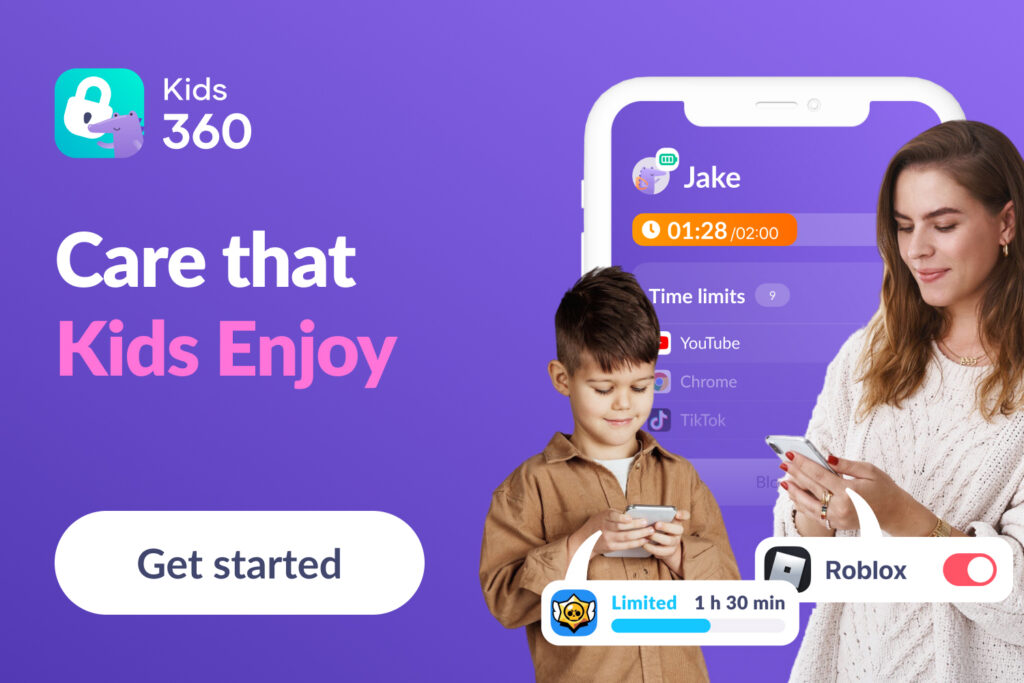
Most traditional options operate like a blunt hammer; they just lock the hardware down and walk away. Kids360 approaches the issue from a completely different angle, running seamlessly across both iOS and Android devices. It is a powerful parental control app designed for mindful parents who want to balance essential safety with genuine developmental care.
Instead of rigid restrictions, Kids360 pairs advanced GPS location tracking with web filtering, screen time management, and a built-in motivation system that encourages children to develop healthy habits. Parents can create tasks and routines, reward completed activities, and help kids learn responsibility while maintaining a positive relationship with technology.
What is Kids360
At its core, Kids360 is a full cross-platform parental control software that links a parent’s smartphone directly to a child’s screen. By pairing your primary admin dashboard with the child-facing companion utility, Alli360, you gain a complete suite of interactive management tools, making it the best parental control software available to parents.
Unlike tools restricted to a single, simple system, the parent dashboard works alongside the child app on both Apple and Android devices. This means whether you manage the setup from an iOS app console or track a tablet, the cross-platform synchronization stays perfectly intact.
One of Kids360’s core strengths is helping families build healthier digital habits. Parents can monitor how much time their children spend on different apps, view detailed usage statistics, and set screen time limits tailored to their family’s rules. The app also includes app-blocking features, allowing parents to restrict access to distracting or inappropriate apps while still giving kids the freedom to use their devices responsibly.
The system is designed to work for families of all sizes. Parents can connect multiple children and manage all their devices from a single account. Flexible subscription options allow families to connect as many children and devices as they need, making Kids360 easy to scale as your family grows.
The app is easy to set up and works quietly in the background, so parents don’t need to spend time on complicated settings or constant maintenance. It helps keep children safe online by filtering websites and blocking access to inappropriate or harmful content before it reaches the device.
At the same time, Kids360 helps parents stay connected in everyday life. The app shows the child’s location on a live map, so parents can see where they are at any moment.
Why Parents Choose Kids360
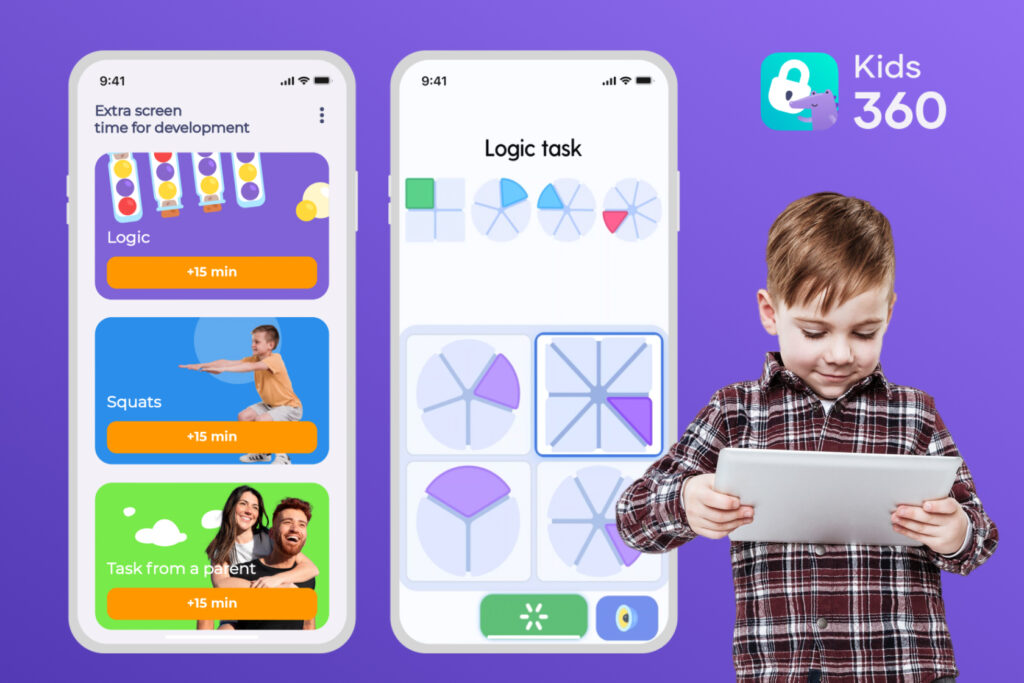
This platform stands out because it focuses not only on restrictions but also on motivation and everyday habits. Instead of only limiting screen time or blocking apps, Kids360 helps families build routines in a more positive way.
The app includes a simple task and reward system. Parents can choose different types of tasks for their child—for example, physical activities, such as exercises or workouts that are checked by an AI Trainer, logical tasks (such as small learning exercises or thinking games), or everyday responsibilities created by parents. Children can also earn extra screen time by reaching step goals tracked by the phone’s step counter.
In this way, the app works less like a strict controller and more like a supportive assistant that helps parents guide their children without constant conflict. By encouraging children to solve problems, complete everyday tasks, and stay physically active, Kids360 supports their development and helps them build healthy habits. Regular breaks from smartphones and more time spent moving are important for children’s physical and mental well-being, making screen time management a positive part of everyday life.
In addition, Kids360 combines both online and offline protection features in one place, which makes it especially convenient for parents. The app is easy to set up and simple to manage, even for users who are not tech-savvy. It also offers a free version, as well as 24/7 support for any questions or issues that may arise.
Key Kids360 Features
To understand why Kids360 is widely considered the best parental control app for modern homes, look at how its systems manage a normal, chaotic family week.
Phone Time Limit & Daily Schedules
Managing total device use shouldn’t mean constantly watching the clock. Parents can simply drop in a total daily allowance or set custom schedules to block things automatically. A parent sets a strict school time schedule from 8:00 AM to 2:00 PM, followed later by an automatic bedtime lock at 8:30 PM. The distracting games disappear entirely during algebra class and sleep hours, keeping the child focused without a single reminder needed.

Activity & Usage Insights
Kids360 also provides clear statistics on how a child uses their device. Parents can see how much time is spent in different apps, which apps are used most often, and how screen time changes over the week.
App Blocking & Category Restrictions
The integrated app blocker gives parents direct say over what actually gets opened on a child’s screen. If a kid is spending hours mindlessly scrolling through hyper-stimulating video feeds, the parent can use app blocking features to put firm time limits on target social media apps. The great part? Educational utilities and basic calling tools stay open so they are never truly cut off.
Safe Internet & Web Content Filtering
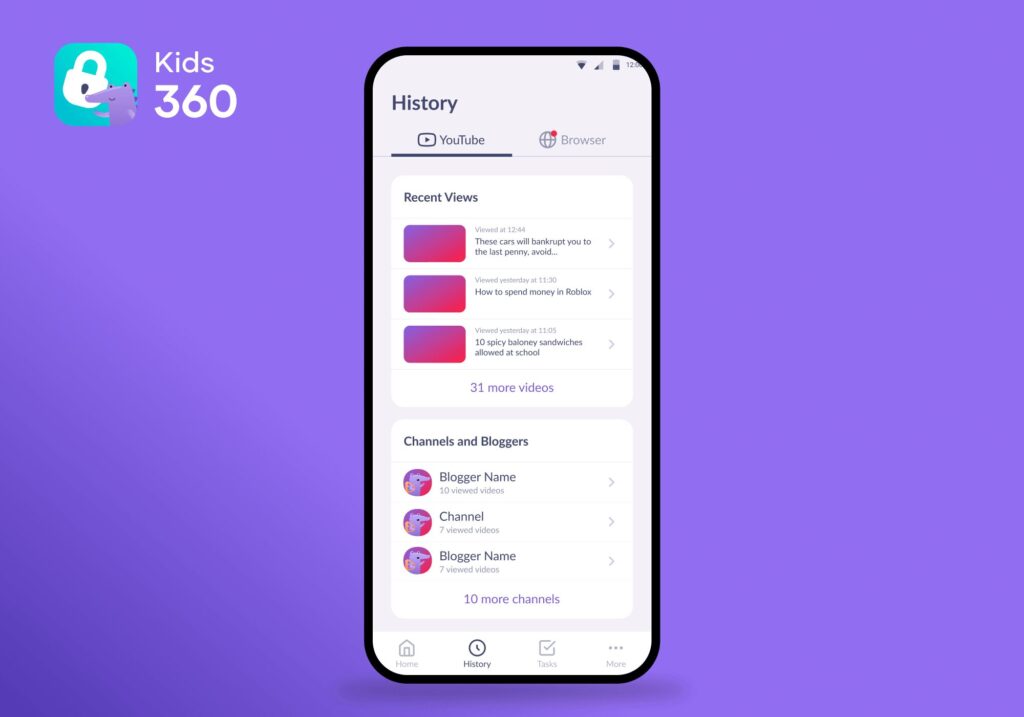
Kids360 helps create a safer online environment by filtering websites and blocking access to inappropriate or harmful content before it reaches the device. Parents don’t need to manually check every page—the system works in the background and reduces exposure to risky or adult materials.
It also helps monitor children’s online activity in a simple way, so parents can stay aware of what kind of content their child is engaging with, including browsers and video platforms like YouTube.
Offline Safety & Location Awareness
Real peace of mind is knowing exactly where kids are the second they step out the front door. The built-in location tracking tools provide live coordinate updates on a clean map layout. And if they ignore text messages because the device is on silent? Parents can send a loud signal that rings at full blast anyway.
Interactive Tasks & Reward Systems
This motivational setup is exactly where Kids360 leaves other apps in the dust. The software uses a massive library of over 4,400 logic, memory, and math challenges. Say a child wants 15 more minutes of gaming. The app prompts them to solve 5 cognitive puzzles first, or complete a task the parent sets, like cleaning up their room. Screen access transforms from a passive habit into an earned achievement.
How to Set Up Kids360
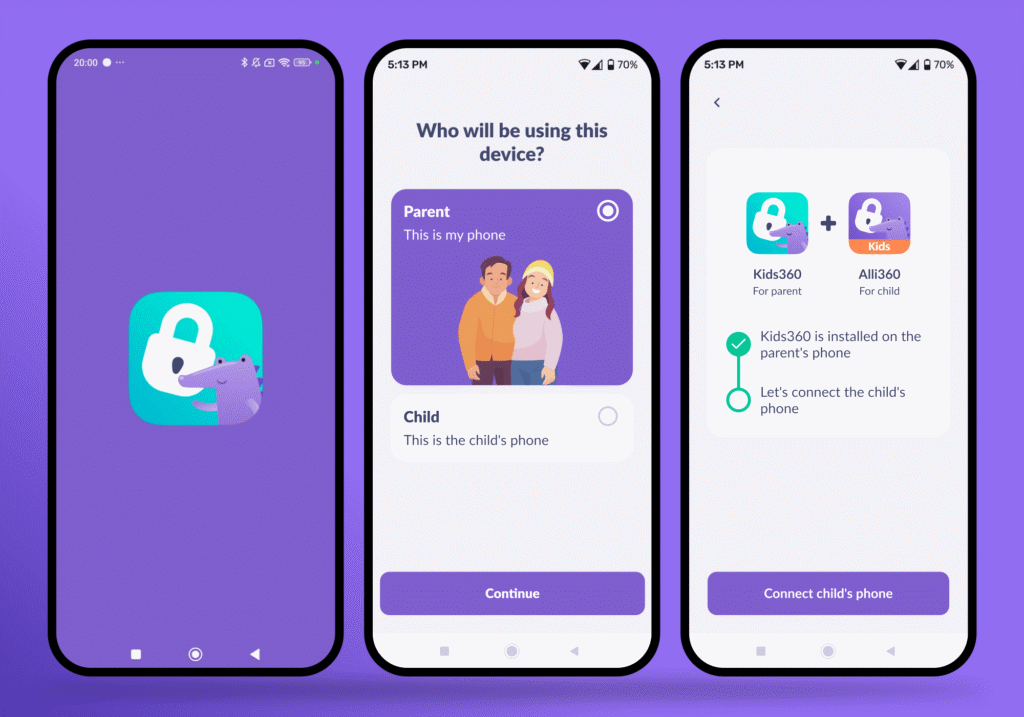
Getting started with Kids360 takes only a few minutes:
- Download the Kids360 app on the parent’s device from the Google Play Store or Apple App Store.
- Create a parent account and complete the registration.
- Install the companion app (Alli360) on the child’s device.
- Link both devices using the unique pairing code shown in the parent app.
- Grant the required permissions for location, app management, and screen time features.
- Adjust basic settings such as screen time limits, app rules, and safety preferences.
Once setup is complete, the system starts working automatically in the background, so parents don’t need to manage it daily.
Try Kids360 for Free
Ready to change how your household manages screen time?
The Kids360 app and the Alli360 child companion utility are ready to download right now on the Google Play Store and the Apple App Store. Try it out for free and experience care that kids love, and screen time limits you can manage!
What Makes a Good Parental Control App?
Finding the right parental control app means cutting past confusing tech industry jargon. A genuinely helpful system should check these specific operational boxes:
- Ease of use: Setting up profiles, linking devices, and updating baseline rules should take under 5 minutes total.
- Instant notifications: The system should push reliable, real-time alerts for critical events, such as a child entering an unverified web domain or requesting a schedule change.
- Screen time management: Parents can set schedules for bedtime, family dinners, and overall screen time limits, as well as monitor usage of specific apps.
- App insights: Parents must be able to see a transparent log of exactly which programs their kids are opening, rather than guessing via vague data lists.
- Flexibility: The boundaries must scale seamlessly, offering strict locks for a young child and independent trust for a teenager.
- Family-friendly design: The interface shouldn’t feel like a hostile corporate surveillance tool; it should focus on balance and habit-building.
- Web security: The software must have a native capability to automatically filter web content, blocking inappropriate or adult-themed websites across all installed browsers, rather than relying on the child’s honor system.
How Traditional Parental Control Software Misses the Mark
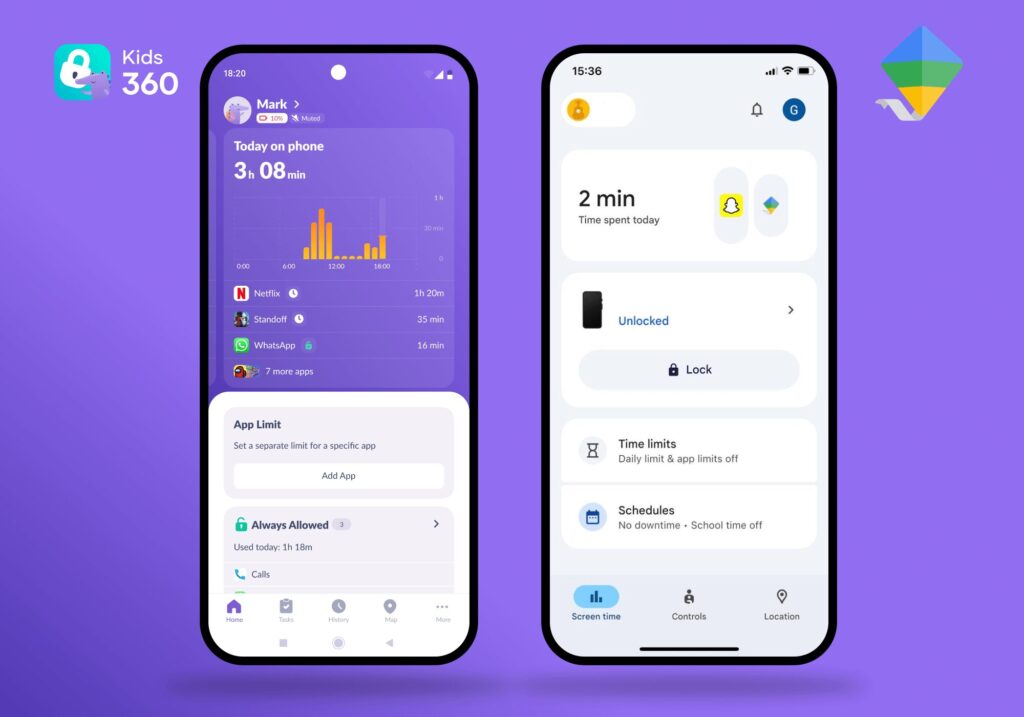
Many families choose a digital safety solution based on name recognition alone, but not all parental control apps fully address real-life family needs. For example, Aura’s parental control software focuses strongly on data protection and fraud prevention, offering advanced tools such as dark web monitoring to detect leaked family credentials. At the same time, it places less emphasis on the everyday side of screen management and habit-building.
Most basic tracking tools also tend to struggle with either setup complexity, limited flexibility, or a lack of features that support long-term digital habits.
Google Family Link
People use Google Family Link because it is a free choice built directly into modern phone systems. While it works relatively smoothly for native Android users, it hits a major technical brick wall if you try to use it on an iOS app environment.
On an iPhone, it fails to provide a reliable way to block apps or detailed application analytics. It tracks location history fine, but it operates purely as a rigid restriction wall with no tools to teach kids self-regulation. Parents looking for more advanced features, like gamified chore rewards or interactive task engines, will quickly hit a technical ceiling with this basic setup.
Bark
Bark is known for its automated monitoring approach. It analyzes messages, social media activity, and other digital interactions to identify potential risks. At the same time, this level of monitoring can feel quite intrusive for some families.
Because it focuses heavily on message-level analysis, it may not suit parents who prefer a more balanced approach that preserves a sense of privacy, especially for older children. In some cases, this can make digital boundaries harder to manage within a trust-based family dynamic.
Qustodio
Qustodio offers a detailed and highly structured dashboard for parental control. It provides strong filtering and reporting tools, but the interface can feel complex for some parents, particularly those who prefer simpler day-to-day management.
Norton Family
Backed by an enterprise antivirus brand, Norton Family handles traditional web monitoring reliably across various mobile devices. But it remains a rigid corporate software tool at heart. It completely lacks interactive features, gamified puzzles, or task rewards. It simply locks the screen when a time budget runs out, leaving parents to deal with the immediate emotional fallout.
Kids360 vs. Competitors: At a Glance
Every family has different technical needs, but real balance requires a tool that bridges safety with positive reinforcement. Here is how the top digital tools handle daily realities:
| Feature | Google Family Link | Bark | Qustodio | Kids360 |
|---|---|---|---|---|
| Cross-Platform Support | Limited on iOS | ✔ Fully Supported | ✔ Fully Supported | ✔ Fully Supported |
| App Management & Limits | ✔ Basic | ✔ Advanced | ✔ Advanced | ✔ Simple & Direct |
| Screen Time Analytics | ✔ Basic | ✔ Advanced | ✔ Advanced | ✔ Clear + Parent-Friendly |
| Filter Web Content | ✔ Standard | ✔ Advanced | ✔ Deep | ✔ Highly Secure |
| Live Geolocation Map | ✔ Basic | ✔ Standard | ✔ Advanced | ✔ Real-Time Live Map |
| Loud Signal | ❌ No | ❌ No | ❌ No | ✔ Yes |
| Habit-Building Tasks | ❌ No | ❌ No | ❌ No | ✔ 4,400+ Built-in |
| Browser History Monitoring and YouTube Activity | ❌ Limited | ✔ Yes | ✔ Yes | ✔ Yes |
| Core Design Philosophy | Restrictive | Surveillance | Analytic | Care & Motivation |
If you’re looking for a more balanced approach to parental control—combining safety tools with motivation and everyday habit-building—Kids360 can be a helpful place to start.
Why Restriction Alone Doesn’t Work in the Real World
Look at how tech rules usually go down at home. A parent hits a hard time lock, the phone goes black, and the child immediately throws a massive tantrum. It is exhausting. Relying purely on harsh parental controls backfires because it doesn’t fix screen dependency.
The Loophole Chase
Kids are smart. If you deploy an aggressive blocker without talking about it, they treat it like a game. They will search forums to learn how to change device time zones, clear mobile app caches, or use random proxies to bypass the software entirely.
Increased Conflict
When keeping your children safe online becomes a punishment tool, domestic tension spikes. The phone becomes a non-stop war zone. When parents rely solely on aggressive message monitoring and strict lockdowns, it breeds resentment. The tighter you lock things down from afar, the more secretive and isolated the child becomes.
The Missing Mechanism
Most traditional tools focus on blocking behaviour, but don’t replace it with an alternative system for learning self-regulation. Without that layer, children are left with only two options: full access or full restriction—with no structured middle ground.
Some newer approaches try to address this gap by introducing structured routines instead of pure restriction. Kids360 uses a task-based system where screen time is connected to simple daily responsibilities and achievable goals, helping children gradually build self-management skills.
Swapping Screen Time Friction for Healthy Balance
Guiding a child through life that is becoming increasingly more phone-based doesn’t have to mean endless fights or broken trust. By moving away from basic surveillance software and using an automated, motivational tool, parents take back control of phones and turn them into helpful utilities for learning and physical growth.
Protecting your household requires a balanced approach. The Kids360 and the Alli360 companion utility are ready to download right now across both major platforms. Take a step toward a calmer, more intentional home environment today by setting screen time limits.