How Much Screen Time Is Too Much: A Parent’s Guide by Age



Raising kids in an era that is overly digital brings unique challenges, especially when deciding how much screen time is too much for growing children. Recent research from Pew Research Center shows that nearly 50% of teenagers report spending almost constant time online, making digital boundaries a primary concern for modern families. Between tablets, computers, and television, electronic devices occupy a huge portion of daily life. Parents frequently express concern about how these digital habits affect development and long-term health.
This article was reviewed and prepared together with Lilla Dale McManis, MEd, PhD, Child Psychologist
Key Takeaways
- Health guidelines recommend limiting recreational screen time to around 1–2 hours daily for school-age children and teens, yet the average tween spends over 5.5 hours a day on devices.
- Not all screen use impacts the brain equally; interactive learning, creative projects, and video calls with family add value, whereas passive scrolling or late-night screen use can cause real harm.
- Watch for physical warning signs like eye strain, sleep disruptions, and weight gain, alongside behavioral changes like mood swings or withdrawing from offline friends.
- Dedicated tools like Kids360 help families set flexible daily time limits, block distracting apps at bedtime or during school, and protect children with safe internet filtering.
- Kids360 turns device time into an earned reward by motivating children to complete 4,400+ logic puzzles, household tasks, or physical exercises to unlock extra screen time.
Table of Contents
Why Parents Worry About Screen Time (and What Is Really at Stake)
Modern parents face a constant struggle balancing technology use with healthy habits. According to research from the Pew Research Center, over 70% of parents express serious concern that their kids spend too much time in front of digital displays. The main fear is not just about lost free time; it is about how constant stimulation alters a child’s brain and daily behavior.
Excessive media consumption can severely impact attention span, emotional regulation, and real-life communication. A landmark study published in JAMA Pediatrics highlighted that high levels of media engagement in early childhood are linked to lower structural integrity in brain tracts that support language and literacy skills. When a child spends hours staring at a smartphone or computer, they have less time for real-world interactions that build emotional resilience.
Beyond brain development, families worry about the long-term risk of sedentary habits. Replacing physical exercise with endless scrolling increases the likelihood of health problems, including weight gain and disrupted sleep patterns. Addressing these fears requires understanding clear, age-appropriate guidelines.
Recommended Screen Time by Age
To keep a child’s screen time within healthy parameters, major medical organizations like the American Academy of Pediatrics (AAP) and the American Academy of Child and Adolescent Psychiatry (AACAP) have established clear age-based benchmarks.
| Age | Recommended Limit | Key Focus & Primary Activities |
|---|---|---|
| Under 18–24 Months | 0 hours (Except video chatting) | High-touch real-world exploration and human interaction |
| 2 to 5 Years | Max 1 hour daily | High-quality educational programs watched with parents or caregivers |
| 6 to 12 Years | 1 to 1.5 hours daily | Balancing schoolwork, physical exercise, and offline friends |
| 13 to 18 Years | 1.5 to 3 hours daily (Non-academic) | Independent time management and digital safety awareness |
Under 2 Years Old
For infants and young toddlers, health experts advise avoiding digital displays entirely, with an exception for video chatting with family. At this stage, a very young child’s brain develops rapidly through hands-on exploration and direct human engagement. Introducing technology early can interfere with language acquisition and motor skill development.
Ages 2 to 5 Years
For older toddlers and preschoolers, limit viewing to a maximum of one hour a day. Parents should select high-quality educational programming where children learn concepts like colors, numbers, or social cooperation. Watching TV together helps young kids process what they see and connect it to real life.
Ages 6 to 12 Years
For school-aged children, establish consistent time limits on media usage. Ensure that device use does not replace sleep, physical exercise, family meals, or school homework. At this age, children generally start playing video games or using a computer for class assignments, making clear rules essential.
Ages 13 to 18 Years
Teenagers need guidance to manage their own digital habits during free time. Non-academic media use should ideally stay around one to two hours a day. Because teens rely on smartphones to talk and text with friends, parents should focus on balancing device use with offline activities and healthy sleep hygiene.
Average Screen Time by Age: What the Numbers Show
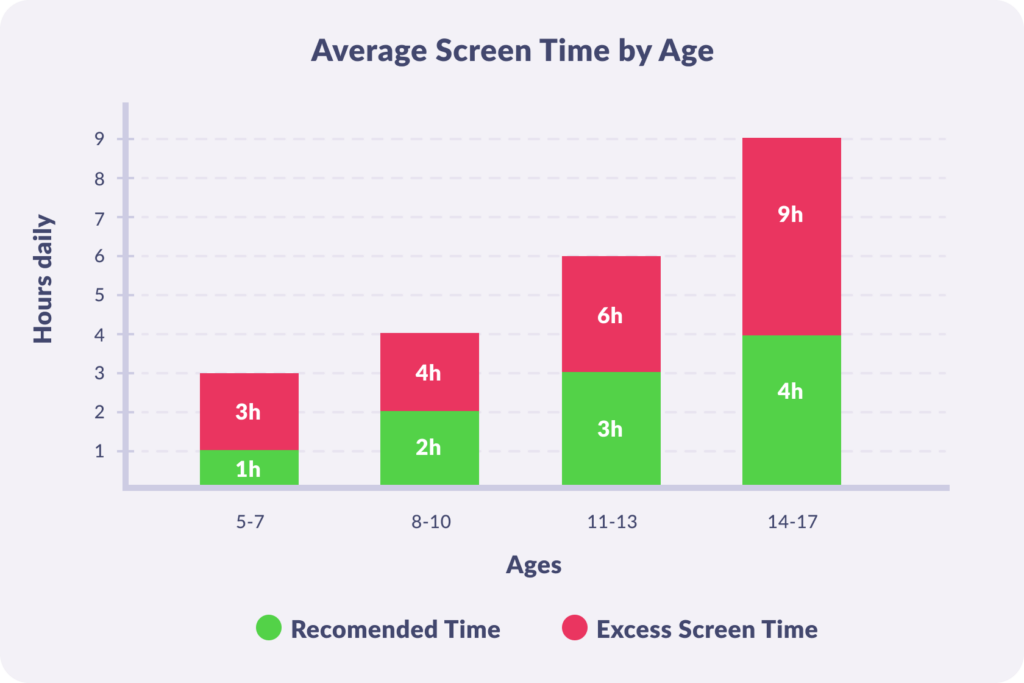
While official guidelines advocate for moderation, actual usage statistics paint a very different picture. Research documented in the Kids360 Average Phone Screen Time Guide shows that daily usage far exceeds expert recommendations across all age groups.
According to AAP, children ages 8 to 12 spend an average of about 5.5 hours a day using entertainment media, while teens spend more than 8 hours a day. Much of this time is spent watching TV, playing games, or browsing social media platforms on a smartphone.
This gap between recommended and actual usage highlights why parents need practical tools to monitor and control device habits.
Screen Time Is Not All the Same
Not all screen time is created equal. Watching short videos for hours has a very different effect than using a tablet to draw, solve puzzles, or connect with grandparents. Understanding these differences can help parents encourage healthier digital habits.
Passive Screen Time
Passive consumption involves mindlessly watching TV, streaming YouTube videos, or scrolling through feeds without active thinking. This type of habit offers little educational value and is most frequently linked to attention struggles and fatigue.
Interactive Screen Time
Interactive media involves problem-solving and active mental engagement. When playing educational video games or solving logic puzzles, children learn to navigate challenges, make decisions, and think critically.
Social Screen Time
Electronic devices allow children to stay connected with family and friends. Activities like video chatting with relatives or working on group projects build social connections, provided they do not replace face-to-face interactions.
Creative Screen Time
Using technology as a creative tool encourages self-expression. For example, activities like writing music, coding, digital drawing, or editing YouTube videos turn a computer into an empowering medium for skill building.
Harmful Screen Time Patterns
The most damaging habit involves exposure to screens late at night or consuming violent, inappropriate content. Looking at screens late in the evening interferes with natural sleep cycles and increases emotional distress due to overstimulation and poor sleep quality.
To understand your child’s digital habits, start by seeing the full picture. Kids360 provides detailed screen time statistics, app usage data, and convenient reports that help parents identify potential issues early and build healthier digital routines before excessive screen use leads to negative consequences.
Health Risks of Excessive Screen Time
When device consumption becomes excessive screen time, it can lead to noticeable physical and mental health issues.
| Health Category | Primary Impact | Underlying Causes & Factors |
|---|---|---|
| Sleep Deficit | Disrupted rest & delayed sleep | Blue light exposure & late-night screen use |
| Mental Strain | Elevated stress & mood changes | Social anxiety, depression, body image issues & isolation |
| Physical Issues | Strain & physical health risks | Sedentary behavior, weight gain & eye strain |
Sleep and Bedroom Device Use
Keeping electronic devices in the bedroom is a primary cause of sleep disruption. The blue light emitted by a smartphone or tablet tricks the brain into suppressing melatonin, making it difficult to fall asleep. According to the National Sleep Foundation, children who keep devices in their bedroom lose significant sleep time per night, causing them to struggle at bedtime.
Mental Health and Social Media
Heavy social media usage is directly tied to mental health struggles among teenagers. The U.S. Surgeon General’s Advisory on Social Media and Youth Mental Health warns that frequent social media browsing can trigger depression, body image dissatisfaction, and social anxiety.
Weight Gain and Physical Health
A sedentary lifestyle centered around watching TV and playing games increases the risk of weight gain. Research from the Harvard T.H. Chan School of Public Health shows that excessive media viewing promotes snacking on unhealthy foods, which can lead to childhood obesity and long-term health risks.
Focus, School, and Real-Life Communication
Constant notifications and fast-paced media make it harder for children to maintain focus during school hours. Overstimulated kids often struggle to pay attention in class or engage in extended in-person conversations, creating academic and social hurdles.
Signs Your Child Has Too Much Screen Time
Recognizing when device usage becomes problematic helps parents step in before bad habits turn into chronic issues.
- Sleep and bedtime disruptions: Your child has trouble falling asleep, wakes up tired, or experiences trouble staying awake during the day.
- Mood, focus, and behavior changes: They exhibit frequent irritability or sudden emotional outbursts when asked to put the phone or tablet down or stand up from their desktop computer.
- Neglecting offline life: They lose interest in playing outside, sports, creative hobbies, or face-to-face conversation with offline friends, preferring screen entertainment over all other activities.
- Physical warning signs: Your child has frequent complaints of headaches, neck tension, chronic eye strain, or physical changes from spending less time moving.
Occasional screen overload is normal, especially during school breaks or busy family weeks. The key is to watch for patterns rather than isolated incidents and step in before unhealthy habits become difficult to change.
How to Reduce Screen Time and Build Healthy Habits
Helping children build a balanced relationship with technology requires clear structure, consistent boundaries, and reliable parental controls. While parents strive to manage screens, 42% say they could do better, according to Pew Research Center. Here are some helpful and manageable strategies for you.
Manage Device Use with Kids360
The Kids360 mobile app provides parents with an effective way to set boundaries without constant arguments. Instead of acting as a simple app blocker, Kids360 balances control with positive encouragement, making device usage productive and mindful.
| Kids360 Core Feature | How It Helps Families | Parent & Child Benefits |
|---|---|---|
| Screen Time Reports | Shows detailed statistics on app usage and overall screen time | Helps parents understand digital habits and identify apps that take up the most time |
| Screen Time Limits | Sets automatic daily usage limits across all apps | Prevents endless scrolling and builds daily discipline |
| Daily Schedules | Blocks distracting apps during school and bedtime | Ensures focus during class and restful night-time sleep |
| App Blocking | Blocks specific apps permanently or limits access based on set time rules | Helps reduce distractions, manage gaming and social media use, and create healthier digital habits |
| Safe Internet & Blocker | Restricts 18+ web content and monitors search habits | Protects children from harmful web content |
| Browser & YouTube Search History | Lets parents review search activity and see what content children are exploring online | Helps parents spot potentially unsafe interests or risks while respecting their child’s growing independence |
| Developmental Tasks | Offers 4,400+ logic puzzles, chores, and physical tasks | Builds healthy digital habits, encourages responsibility, and motivates children to keep using the app instead of trying to remove it |
Monitoring Usage and App Habits
Through Kids360 App Usage Statistics, parents gain clear insights to monitor where their child spends time online. This visibility helps families identify problematic app habits early, take a short break from screens, and adjust boundaries as kids grow.
Setting Time Limits and Schedules
Parents can set strict time limits for entertainment apps. The daily scheduling tool allows you to automatically lock social media and games during bedtime or school hours, eliminating nighttime distractions.
Blocking Apps and Managing Access
With Kids360, parents can block specific apps completely or limit access based on their child’s needs. Whether it’s preventing the use of distracting games during homework time or restricting certain apps that are not appropriate for a child’s age, flexible blocking options help parents create a safer and more balanced digital environment.
Encouraging Growth with Earned Screen Time
Kids360 offers an interactive task feature where children can earn extra device time by completing beneficial activities. Kids can solve logic puzzles, complete household chores set by parents, or engage in physical exercise recorded by the AI Trainer and step counter. This approach teaches kids that screen access is a privilege earned through effort.
Get started in just 5 minutes—free, simple, and convenient. Try Kids360 today and create healthier digital habits for your family.
Practical Tips for Reducing Screen Time
Reducing screen time continues with simple daily changes. Parents can create screen-free periods during meals and family activities, keep devices away from the bedroom at night, and encourage children to replace part of their online time with hobbies, exercise, or time with friends.
For more practical strategies and step-by-step advice on helping children spend less time on devices, explore our guide on how to reduce screen time.
Finding the Right Balance with Screen Time
There is no universal screen time limit that works for every child, but experts recommend keeping it within reasonable limits. For children ages 7–14, many health organizations suggest aiming for around 1–2 hours of recreational screen time per day, while making sure devices do not replace sleep, physical activity, learning, or social interaction.
The right balance also depends on a daily routine and the type of activities kids do online. When screen use starts affecting sleep, mood, focus, or family life, it may be a sign that new boundaries are needed. With clear rules and supportive tools like Kids360, parents can help children build healthier digital habits while still enjoying the benefits of technology.
Sources & References
- Digital Ecosystems, Children, and Adolescents: Policy Statement, American Academy of Pediatrics (AAP), 2026
- Screen Time and Children, AACAP (American Academy of Child and Adolescent Psychiatry), 2025
- Teens, Social Media and Technology, Pew Research Center, 2023
- Parents and the State of Tech in Childhood, Pew Research Center, 2020
- Screen Media Exposure and Obesity in Children and Adolescents, PubMed, 2017
- Bedtime screen use behaviors and sleep outcomes: Findings from the Adolescent Brain Cognitive Development (ABCD) Study, PubMed, 2023
- Average Amount of Screen Time for Children and Young Adults, American Academy of Pediatrics (AAP), 2026
- Children and Sleep, National Sleep Foundation, 2026
- Social Media and Youth Mental Health, U.S. Surgeon General’s Advisory on Social Media and Youth Mental Health,’ 2025
- Screen Time and Child Health Risks, Harvard T.H. Chan School of Public Health
- Relationship of screen time with anxiety, depression, and sleep quality among adolescents: A cross-sectional study, PubMed, 2024
- Effects of Excessive Screen Time on Child Development: An Updated Review and Strategies for Management, PubMed, 2023
- How Parents Manage Screen Time for Kids, Pew Research Center, 2025