What Digital Safety Means for Families — and How Kids360 Can Help


Most new parents spend a great deal of time stressing over baby-proofing their homes. But as kids get older, keeping them safe becomes even more overwhelming, especially when it involves the internet. Parents frequently hear the term “digital safety,” but it often feels abstract. The real challenge is applying it in daily life, which is where safety tools like Kids360 can play a critical role.
Key Takeaways
- Digital safety is an essential part of modern parenting, as children face risks like harmful content, cyberbullying, and unwanted online contact in everyday digital spaces.
- Kids often lack the skills to fully understand online risks, which makes guidance, boundaries, and ongoing conversations with parents crucial.
- Many online dangers are not only technical but also emotional and social, affecting children’s behavior, confidence, and wellbeing.
- Healthy digital habits—such as privacy awareness, careful sharing, and basic online rules—help reduce exposure to risk.
- Tools like Kids360 can support parents by providing visibility into app usage and helping manage screen time and access to apps when needed.
Contents
What Is Digital Safety?
Digital safety refers to the precautions we can take to protect our data and keep our kids safe online. As technology advances, so do the digital risks and dangers we face in the virtual world, making online safety important to everyone. You may have noticed many websites increasing their security measures to stay a step ahead of digital threats. Tools to help people online might include strong passwords or multi-factor authentication.
For adults, online safety often focuses on protecting our devices and software, guarding against financial threats, and mitigating privacy breaches. Identity theft and fraud are common concerns when internet users share personal information. Seniors, who may not be as digitally savvy, are often the targets of fraud for financial gain, such as phishing scams and romance scams. And any online device can be at risk of malware and hacking.
However, for kids, digital dangers are even greater. Not only are children more vulnerable overall, but they spend a great deal of time navigating online content, often without understanding the risks they face.
Common Online Risks for Children
Though there are a number of potential safety issues for kids online, most fall into just a few dangerous categories.
Inappropriate Content
From violence to adult content and everything in between, the internet can be a minefield of harmful or illegal content. Research shows that one in four children ages 10–17 has encountered unwanted pornography online. It is easy for kids to stumble upon information that they are not ready for. Since they often browse on their own, they don’t have the benefit of an adult to guide them or offer necessary context.
Cyberbullying
Kids can be prime targets for online harassment as they interact with people online. Their increasing reliance on social media sites and other forms of virtual communication can leave them vulnerable and make their internet safety important in unique ways.
According to the Pew Research Center, around 46% of U.S. teens say they have experienced at least one form of cyberbullying, highlighting that online risks for younger users are not rare exceptions but common experiences. At the same time, broader research on teen online behavior shows that many adolescents report experiencing some form of online harassment, underscoring that these risks are not only technical but also social and emotional in nature.
Excess Screen Time
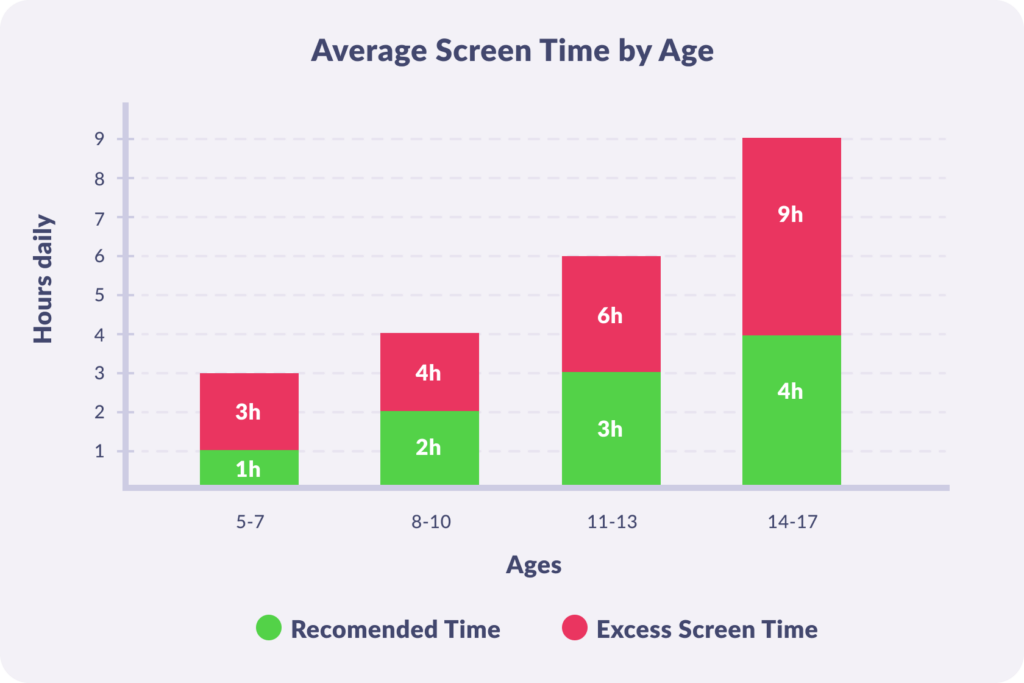
Many adults are addicted to screens these days, so children are even more susceptible. They often lack the awareness and self-control necessary to set appropriate limits on their own. Online video games can be especially addictive as they become more and more immersive. According to a Common Sense Media study, the average teen spends almost two hours gaming daily, with boys averaging even more.
Internet Predators and Online Grooming
Perhaps the scariest cyber safety concern is the potential for kids to be the focus of dangerous attention online. Thanks to virtual anonymity, it is all too easy for a cyber-stranger to pretend to be a child’s friend in order to gain access to them. In fact, close to 60% of teens have received an email or instant message from a stranger. Young people often do not understand the social and ethical implications of risky online relationships.
How Parents Can Ensure Kids’ Digital Safety in Everyday Life With Kids360
The demands of modern parenting are already overwhelming, so adding rules for internet safety can seem impossible. Since digital safety depends on habits, time, and daily behavior, parents need more than rules—they need a way to actually see and manage what’s happening in their kids’ online world. This is where tools like Kids360 become useful in helping kids stay safe online.
App Usage Insights and Usage Statistics
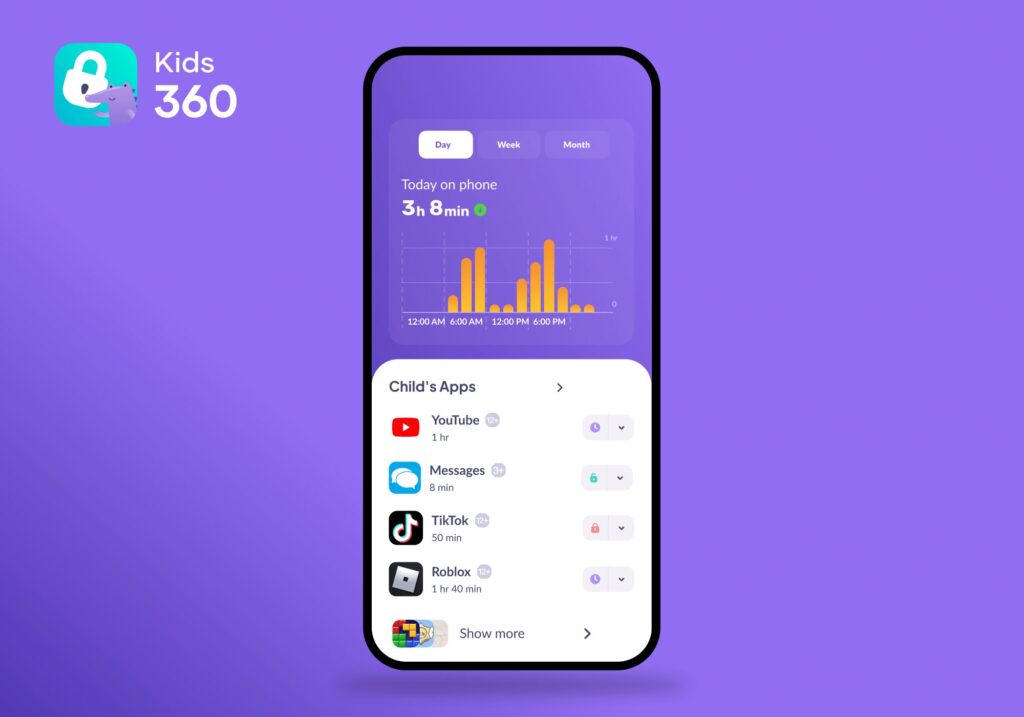
Kids360 gives parents a clear overview of how the child uses their device in everyday life. You can see which apps take the most time, how screen time is distributed throughout the day, and how usage patterns change over time.
This helps parents understand not just what the child is doing online, but also how their digital habits are forming—for example, whether certain apps start taking more time than expected or interfere with sleep and school routines.
App Management and Blocking Risky Content
The Kids360 app makes online safety more structured by allowing parents to block inappropriate content and dangerous websites using safety filters. They can also restrict access to apps with potentially risky features. This helps reduce the chance that children will encounter harmful content, whether accidentally or intentionally, while exploring the internet.
Safe Browsing Control and Digital Awareness
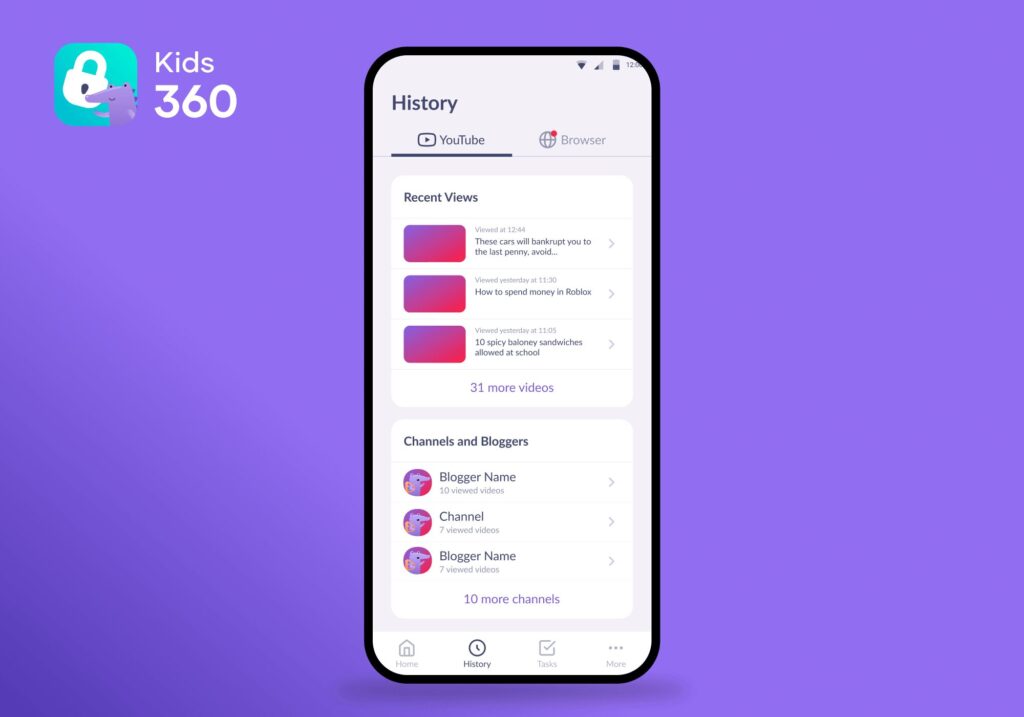
To better understand a child’s online interests, Kids360 provides access to browser search activity and YouTube viewing history. This allows parents to see what topics are gaining attention and notice any sudden changes in behavior or curiosity. It gives context, not just raw data, which can help parents respond more thoughtfully.
Screen Time Limits and Daily Routines
When excessive screen time is a concern, Kids360 lets parents set a limit on overall device use. They can also define time boundaries when the phone should not be accessible. For instance, games and apps can be blocked during school hours or after bedtime. This helps build a more balanced digital routine without constant arguments or manual control.
Location Tracking and Loud Signal
Kids360 also includes offline safety tools that help parents stay aware of where their child is in real time. You can see the current location of your child on the map and quickly understand whether they are at school, at home, or on the way somewhere.
If the child is not responding to calls or messages, parents can also send a Loud Signal to the device. It makes the phone ring at full volume even if it is set to silent, helping get attention quickly in everyday situations.
If you want a simple way to support your child’s online and offline safety without constant supervision or stress, Kids360 can help you build healthy digital boundaries in everyday life. Try Kids360 for free and start creating safer digital habits for your family today!
Most Important Online Safety Tips For Kids
Though every kid and family situation is different, there are a few universal guidelines to help all parents navigate the online space with their children.
Limit Screen Time
According to the National Institutes of Health, excess screen time has been linked to a wide variety of physical and mental health concerns, such as obesity, sleep disturbances, and vision problems. Even small pockets of time that kids might spend on social media or gaming can add up. Using a screen time limitation tool like Kids360 can help keep limits firm so parents don’t need to keep track of time on their own.
Teach Kids Not to Share Personal Information Online
Young people are sometimes not aware that “stranger danger” applies online as well. They need to learn to maintain privacy and avoid sharing sensitive information, such as:
- Home address or exact location
- Phone number or email address
- Passwords or login credentials
- School name, class, or daily schedule
- Personal documents (ID cards, social security numbers, passport data)
- Bank card details or payment information
- Photos that reveal location or private surroundings
They can also take other precautions, such as using strong, unique passwords for different accounts and avoiding sharing them with anyone—even friends. It’s also important to teach children not to install unknown software or click on suspicious links, as these can compromise personal data without their awareness.
Help Kids Use Social Media Safely
Social media is often the first place where children start building their digital identity, and it can be both a creative space and a source of risk if not managed properly.
One of the key steps is setting accounts to private mode. This ensures that only approved friends can see posts, photos, and personal updates. It also reduces the chance of unwanted contact from strangers.
Parents can also encourage children to:
- Use a nickname instead of their full real name
- Avoid posting personal details in bios (school, age, location)
- Regularly review their followers list and remove unknown accounts
- Disable location tagging on posts and stories
- Think before posting, as content can stay online permanently
For younger children, it can also be helpful to consider age-appropriate or child-focused social platforms, where privacy settings and content exposure are more strictly controlled by design. These platforms are generally built with stronger safety defaults and limited interaction with unknown users.
Finally, it’s important to explain that even “private” accounts are not completely risk-free—screenshots and resharing can still happen. The goal is not only privacy settings, but also healthy digital judgment over time.
Use Parental Controls to Limit Online Experiences

Kids can stray into dangerous territory online without even realizing it. An app like Kids360 can play a vital role in keeping kids safe by blocking 18+ content and restricting access to any other sites or apps that parents want to keep off-limits. In general, parental controls are critical tools for staying informed and monitoring young people’s online activities.
Talk Openly with Kids About Online Safety
Just as parents need to educate kids about real-world dangers, they also need to discuss the ones in the virtual world. This includes teaching children about online grooming, harmful or illegal content, and online harassment. They also need to take proper precautions, such as avoiding suspicious links and fake websites. An open-communication policy can help kids feel comfortable bringing up potential online risks to their parents.
Teach Basic Online Habits That Prevent Risk
Beyond rules and conversations, children also need simple everyday habits that reduce risk in practice:
- Logging out of accounts on shared devices
- Checking privacy settings in social media apps
- Turning off location sharing when it is not needed
- Refusing unknown friend requests or messages
- Reporting or blocking suspicious users instead of replying
- Updating apps regularly to reduce security vulnerabilities
These small actions create a baseline of digital hygiene that protects children even when parents are not рядом.
How to Talk to Kids About Online Safety
Even when parents understand the importance of online safety conversations, that does not always make it easy to start them with kids. But it is critical to put kids at ease when discussing any uncomfortable topic. Creating an environment of open communication allows kids to bring potential issues to their parents’ attention. They should feel encouraged to share any suspicious or uncomfortable activity that they might encounter online.
According to The Innocent Lives Foundation, parents have to be sensitive when discussing online safety and use age-appropriate language. For instance, they recommend referring to online predators as “tricky people” when talking to young kids. Parents can also remind children that following safety rules allows them to keep having fun online.
It also helps to give kids simple phrases they can actually use in real situations. For example:
- “If something online makes you uncomfortable, you can always come to me—no matter what.”
- “You won’t be in trouble for telling me.”
- “We solve online problems together.”
Depending on age, parents might try roleplaying with kids to practice what to do in risky scenarios. For example, asking them what they could do if someone made them feel uncomfortable online, and then helping them to learn the “Stop, Block, and Talk Method.” This means that they stop talking to the person, block them, and then tell a trusted adult about it.
It is also important to explain the difference between privacy and secrecy in simple terms. For example: “Privacy means you choose what to share. Secrecy is when someone asks you to hide something from me—that’s when I need to know.”
Above all, reassurance matters more than warnings. Kids are more likely to open up when they feel supported, not questioned. A steady message like “You’re not in trouble. I’m here to help” builds trust over time and makes future conversations easier.
In the end, online safety is just another aspect of parenting that requires attention, knowledge, and healthy rules. It involves understanding the risks kids face online so that parents can keep kids safe on their electronic devices. Tools like Kids360 make it easier for parents to set age-appropriate limits and protect kids from digital dangers.
Sources & References
- Digital Safety | A Complete Guide to Staying Safe in the Online World, Zeeko, 2026
- Safe Online: What is digital safety and how do we measure it?, Safe Online, n.d.
- What is Digital Safety?, iCanHelp, n.d.
- Parents' Guide to Personal Safety (PDF), U.S. Department of Education, n.d.
- 2025 Cyberbullying Data, Cyberbullying Research Center, 2025
- Protecting Children Online: Facts for Parents, San Diego County District Attorney’s Office, 2026
- Screen Time, Digital Media Use, and Mental Health Outcomes in Children and Adolescents, National Library of Medicine (PMC), 2023
- SchoolSafety.gov: Online Safety for Students and Families, U.S. Department of Homeland Security, 2024
- Staying Sharp as Parents and Talking to Children About Online Safety, The Innocent Lives Foundation, 2023
- Teens and Cyberbullying, Pew Research Center, 2022